Unlimited conversions. Zero data entry.

184 active clients in one workspace, largest firm on record

Every Client in One Dashboard

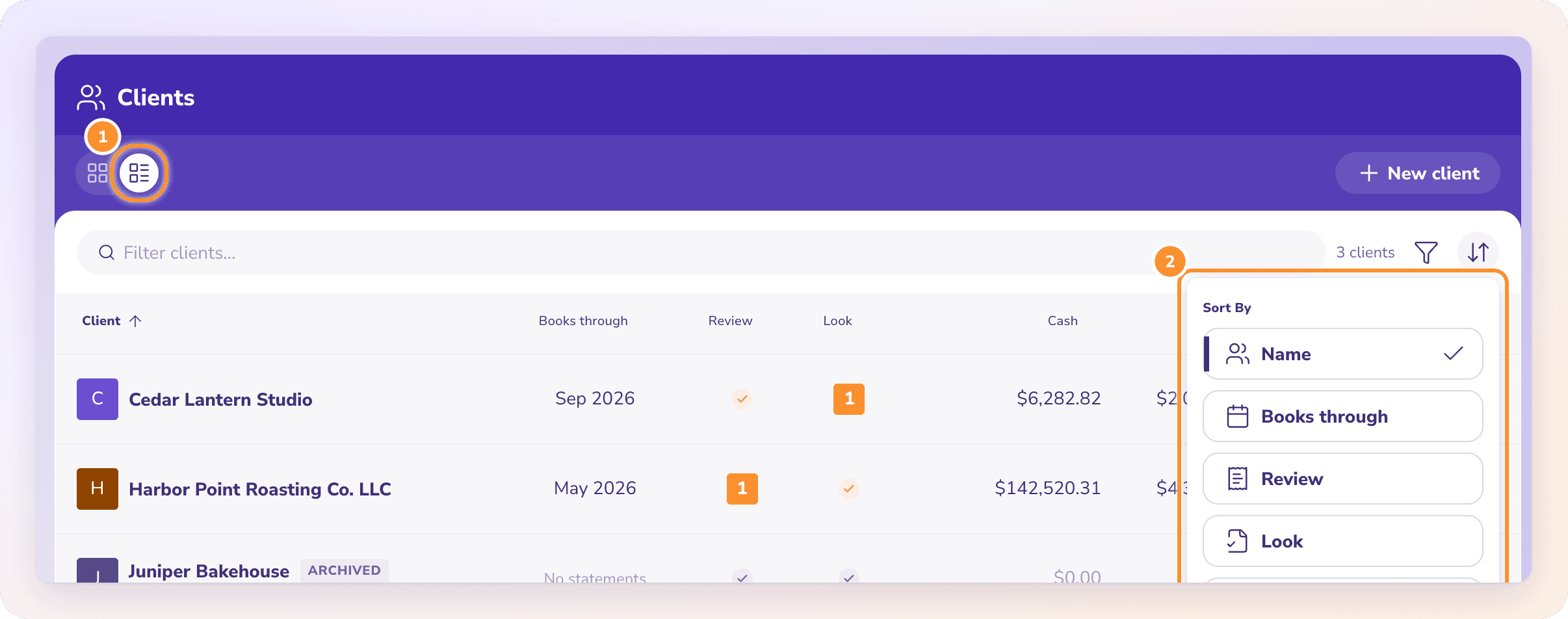
The firm side home screen for accountants running 20 to 200 clients. Triage what needs you today. Batch operate across the book of business. Close the month top down.

Multi client accounting dashboard for firms showing client list with close status and triage in Zera Books

The short version. The Zera Books multi client accounting dashboard surfaces every client a firm serves on one screen, sorted by what needs attention today. Unread messages, overdue document requests, low confidence extractions, and close status all roll up per client. The largest firm on the platform runs 184 active clients in one workspace. $79 flat, unlimited clients, 99.6% extraction accuracy on every document that flows through.

184
Largest firm client count
99.6%
Document extraction accuracy
2.3d
Median month end close cycle
$79
Flat, unlimited clients

By Damin Mutti, founder of Zera Books. Last reviewed 2026-05-21.

A triage queue, not a client list

Most firm software thinks the home screen is a directory. You see a list of clients, sorted alphabetically, each with a status pill that tells you whether the file exists. That is fine for an audit. It is useless for a Monday morning. On Monday morning you want to know which client emailed you over the weekend, which has a Q3 statement still missing, which one is blocking February close, and which one has a low confidence extraction sitting in a queue.

Zera Books rebuilt the home screen as a triage queue. Every row shows the work, not just the client. An attention score combines unread messages, overdue requests, extraction flags, and close status into one number. Sort descending and the top of the list is literally what to do first. A Portland firm running 47 clients told us the dashboard cut their morning ramp from 25 minutes of mental archaeology to 4 minutes of clicking through the top of the queue.

For the broader firm operating system this dashboard sits inside, see the AI accountant. The dashboard is the entry point. Everything else lives one click below it.

How the multi client dashboard works, step by step

Five steps from sign in to a closed month across 40 clients. No client switcher, no tab graveyard.

01

Open the firm dashboard

A single sign in lands you on the multi client view. No client picker, no first file auto opened. Every client renders sorted by what needs attention today, top of list first.

Replaces the QBO client switcher and the 14 tab workflow.

02

Sort by attention score

The default sort combines unread messages, overdue requests, low confidence extractions, and close status into one weighted score. Whatever sits at the top is what to work on next.

Customize the weights per firm or per team member.

03

Click into a client inline

One click expands the client workspace in place. Books, review queue, portal, messages, all in one panel. Press escape and you are back at the dashboard. No tab graveyard.

Average context switch time: under 2 seconds.

04

Batch operate across clients

Filter by tag, close status, or owner. Select multiple rows. Apply: assign reviewer, send templated message, set close target, run a report batch. Quarterly tax requests to 40 clients ship in 90 seconds.

The most used batch action is the quarterly tax document request.

05

Close the month, top down

Filter to in progress close. Work the list from top to bottom. Status flips to ready for review when the checklist is done. The firm dashboard becomes a close burndown.

7 day close cycle compressed to 2 to 3 days for the average firm.

Zera Books multi client dashboard vs QuickBooks Online Accountant

QBO Accountant is fine if your job is to administer subscriptions. It tells you which file exists, which client is on which plan, who logged in last. That is a directory. It is not a workbench. Karbon and Canopy fill some of the practice management gap but they do not touch the books, so you end up running two systems and copy pasting status updates between them.

Zera Books ships the practice dashboard and the ledger inside one product. Close status, document review, messaging, and request tracking all roll up to the same triage queue. The dashboard is the one screen the firm starts and ends every day on.

CapabilityZera BooksQBO Accountant
Default home screenMulti client triage dashboard with attention scoringFlat list of client subscriptions, no triage
Cross client close trackingClose status column, filter to in progress or blockedPer client, no firm wide rollup
Batch actions across clientsBulk assign, bulk message, bulk request, bulk reportOne client at a time
Document review queueFirm wide queue with 99.6% extraction accuracyReceipt capture per client, no statement parsing
Per client costUnlimited clients on $79 flatPer client subscription stack scales fast
Mobile dashboardResponsive, but desktop optimized for dense viewMobile QBO app is per file, no multi client view

QBO Accountant feature surface per the official Intuit page. Practice management norms documented by the AICPA firm practice management hub. BLS data on accounting and bookkeeping employment available here.

Real numbers from firms running the dashboard

90 days of activity across firms running 20+ clients each. No demo data. Real Mondays, real close cycles, real quarterly tax pushes.

  • 2.3 day median month end close cycle across the production base. Down from 6 to 8 days on QBO Accountant alone.
  • 184 active clients in the largest single firm workspace. Dashboard stays snappy at that scale.
  • 90 seconds to send a templated quarterly tax document request to 40 clients in one batch operation.
  • 4 minute morning ramp reported by a 47 client Portland firm. Was 25 minutes on the old stack.

One honest caveat. Firms with under 8 clients do not get a huge boost from the dashboard because the triage problem is not big enough yet. The break even point where the dashboard pays for itself in saved Mondays is around 12 to 15 clients.

Multi client accounting dashboard in use at a firm with multiple monitors showing client triage

How to set up the dashboard for your firm

Activate a firm workspace on the trial signup. Import your client list via CSV or connect to QBO and Xero to pull clients across automatically. Tag clients by industry or fiscal year end. Invite team members and assign owners per client. Set close target dates for the current month. The whole onboarding for a 40 client firm runs in under an hour, most of which is choosing how to tag the book of business.

Pricing stays flat at $79 regardless of client count, so there is no commercial reason to slow walk the migration. See the pricing page for the trial details. If you want a guided walkthrough on the multi client workflow, the multi client workflow guide covers the playbook step by step.

“On QBO Accountant I had 47 client tiles and I genuinely had no idea where to start on a Monday. The Zera dashboard sorted my morning. The top three rows are always the right three rows to work on. Close went from a week of dread to a 2 day pass through the list. The batch document request alone saved me a full Friday last quarter.”

Ashish Josan, CPA

Partner at a 60 client accounting firm

Frequently asked questions about the multi client dashboard

What is a multi client accounting dashboard?
A multi client accounting dashboard is the firm side home screen that shows every client you serve in one view, with the work that needs your attention surfaced first. In Zera Books that means unread messages, low confidence extractions, outstanding document requests, and month end close status for every client, all sortable, all filterable. No client switcher dropdown, no opening 14 tabs.
How is this different from the QuickBooks Online Accountant client list?
QBO Accountant gives you a flat list of client subscriptions with a status pill (gear icon, books status, last login). It tells you which file exists. It does not tell you which client needs you today. The Zera Books multi client dashboard is a triage queue. Every row shows what is open, what is overdue, and what is fresh, so you start the morning at the top of the list instead of guessing where to begin.
How many clients can I manage on the dashboard?
No hard cap. The largest firm running on Zera Books has 184 active clients in one workspace. Sorting and filtering stay snappy at that scale because the dashboard renders virtualized rows. Most solo bookkeepers run 20 to 40 clients, mid firms run 60 to 120, and the unit economics still work because pricing is flat at $79 per month regardless of client count.
What does each client row show on the dashboard?
Name, primary contact, current month close status, count of low confidence extractions waiting, count of open document requests, unread messages, last activity timestamp, and a tag for industry or workflow. You can add custom columns (annual revenue, fiscal year end, point of contact) and save dashboard views per team member.
Can the team share the dashboard view or is it per user?
Both. The default firm view is shared and shows the full client list. Each team member can also pin a personal view that filters to the clients they own. Comments and assignments are visible across the team so a senior reviewer can pick up where a junior left off without messaging on Slack to ask.
How does the dashboard handle month end close across clients?
There is a close status column with five states (not started, in progress, blocked, ready for review, closed). Filter to "blocked" and you see only the clients waiting on something. Click into the row and the close checklist opens for that client. Firms running a 20 client close use this to compress what was a 7 day cycle into 2 to 3 days.
Does the dashboard integrate with QuickBooks Online and Xero?
Yes. Each client row can be linked to a QBO or Xero file, and the close status syncs both ways. You can also run clients fully on Zera Books native ledger if you want to leave QBO behind. Many firms run a mix: legacy clients stay on QBO with Zera handling document extraction and review, new clients onboard fully on Zera.
How does multi client billing work?
The $79 flat plan covers the firm. There is no per client fee and no per portal user fee. Many firms rebill clients at a markup, but that pricing is between you and your client. Zera Books does not meter document volume or seat count.
Can I bulk assign or batch operate across clients?
Yes. Select multiple clients from the dashboard and apply actions: assign to a team member, change tags, set close target dates, send a templated message, run a reporting batch. The most common batch operation is sending a quarterly tax document request to 40 clients at once with the same checklist.
Is there a mobile version of the multi client dashboard?
The dashboard is responsive and works on a tablet or large phone, but the dense view is built for desktop. Most firm work happens on a laptop. The client side portal is mobile first because owners are on phones. The firm side dashboard is desktop first because triage is faster with a wide screen.

Run your whole firm from one screen.

Import your client list, tag the book of business, work the top of the queue. $79 flat, unlimited clients, no per seat fee.