Invoices
The Invoices page reads every invoice in a PDF, line by line, and proves the lines against the subtotal, the total and the amount due.
What's read from an invoice
Upload invoices and bills on the Invoices page: click Upload invoices in the page header, or drop them anywhere on the page. One PDF can hold one invoice or many, and each invoice is shown as its own card. For each invoice, ZeraBooks Convert reads:
the invoice number and the vendor ("Vendor not printed" when there's none);
Bill to, Invoice date, Due date, Terms and PO number;
every line, with Description, Qty, Unit price and Amount;
the totals: Subtotal, any discount, tax (with its rate), shipping or other charges, Total, any payments, and Amount due.
Open an invoice document
In the left navigation, click Invoices.
Pick a document under Invoice Documents on the left. Its tile shows the number of invoices and a date.
The invoices open on the right. The toolbar shows the file name and the number of invoices in it.
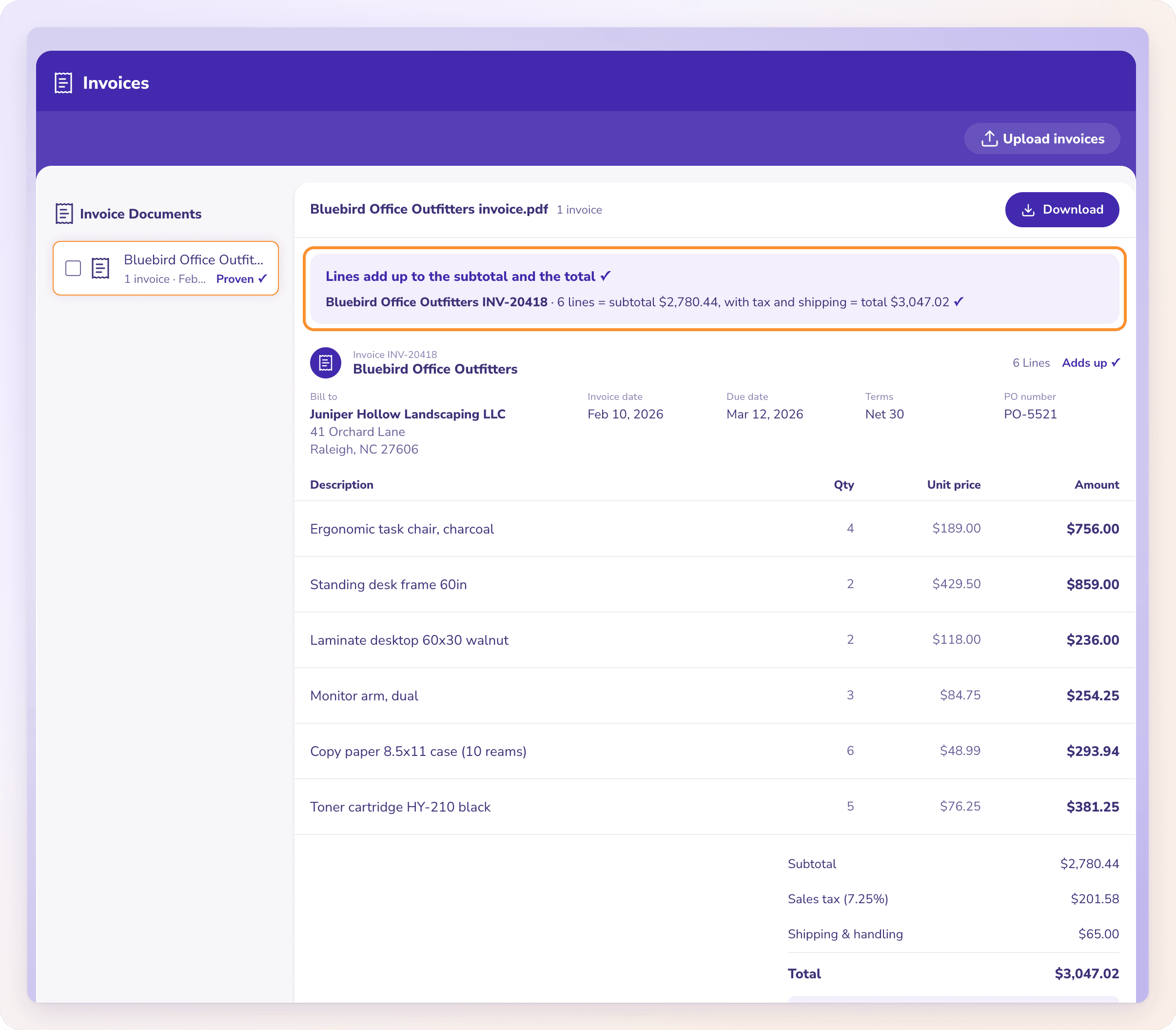
Each card is headed "Invoice {number}" and the vendor. On the right of the heading are the number of lines and the invoice's proof: Adds up ✓, Needs a look or No totals to check.
How invoices are proven
Convert checks each invoice against its own printed figures:
Each line's quantity × unit price = the line amount.
The lines add up to the subtotal.
The subtotal, with discounts, tax, shipping and other charges, adds up to the total.
The total, less payments, equals the amount due.
The banner above the cards gives the result:
| Banner | What it means |
|---|---|
| "Lines add up to the subtotal and the total ✓" (with "on all n invoices" when there are several) | Every invoice adds up. |
| "Needs a look before you download." | At least one figure doesn't add up. A line for each one says which, for example that the lines add up to one amount but a different subtotal is printed. |
| "These invoices print no totals to check against." | There are no totals to check the lines against. |
| "No invoices were found in this document." | Convert didn't find an invoice in the PDF. |
A figure that doesn't add up is marked with an orange warning triangle on the card.
Editing
Invoices can't be edited in Convert. If an invoice was read wrongly, compare it with your PDF and upload a clearer copy. See When a document can't be read.
Download invoices
Open the document and click Download in its toolbar. In the Download dialog, choose a Format, choose CSV or Excel, and click Download. To download several documents in one file, tick them in the list on the left, then click Download n together at the top of the list.
There are two ready-made formats for invoices:
All details: two sheets, "Invoices" (one row per invoice) and "Line Items" (one row per line). In Excel they're two sheets in one file; as CSV, you get a ZIP with two CSV files.
Bills import (one row per line): one sheet with the vendor, bill number, dates and each line, the shape most bill imports take.
Frequently Asked Questions
Can one PDF hold several invoices?
Yes. Each invoice in the PDF gets its own card, and the proof covers all of them.
Can I edit an invoice line?
No. Invoices can't be edited in Convert. Upload a clearer copy of the PDF if one was read wrongly.
How do I download invoices?
Click Download on the invoice document. For several documents at once, tick them in the list and click Download n together.
Why did my CSV download come as a ZIP?
The All details format has two sheets, "Invoices" and "Line Items", and a CSV file can hold only one. Convert puts both CSV files in a ZIP. Choose Excel to get both sheets in one file, or a one-sheet format such as Bills import (one row per line).
Can I import invoices as bills?
Yes. Download them in the Bills import (one row per line) format: one row per invoice line, with the vendor, bill number and dates on every row, the shape most bill imports take.
What does "No totals to check" mean?
The invoice prints no subtotal or total, so there's nothing to prove its lines against. Compare it with the PDF before you use it.
Learn more about Bank statement converter: Statements to checked Excel or CSV, split by account and cardholder.
Still stuck? A real person reads every message—come say hello.