Financial statements
The Financial Statements page reads profit and loss statements, balance sheets and cash flow statements line by line, and checks every total against the lines it adds up.
Open a financial statement
Upload PDFs of a profit and loss, balance sheet or cash flow statement on the Financial Statements page: click Upload statements in the page header, or drop them anywhere on the page. One PDF can hold several statements.
In the left navigation, click Financial Statements.
Pick a document under Financial Statements on the left.
It opens on the right. The toolbar shows the company name and the number of statements in the document.
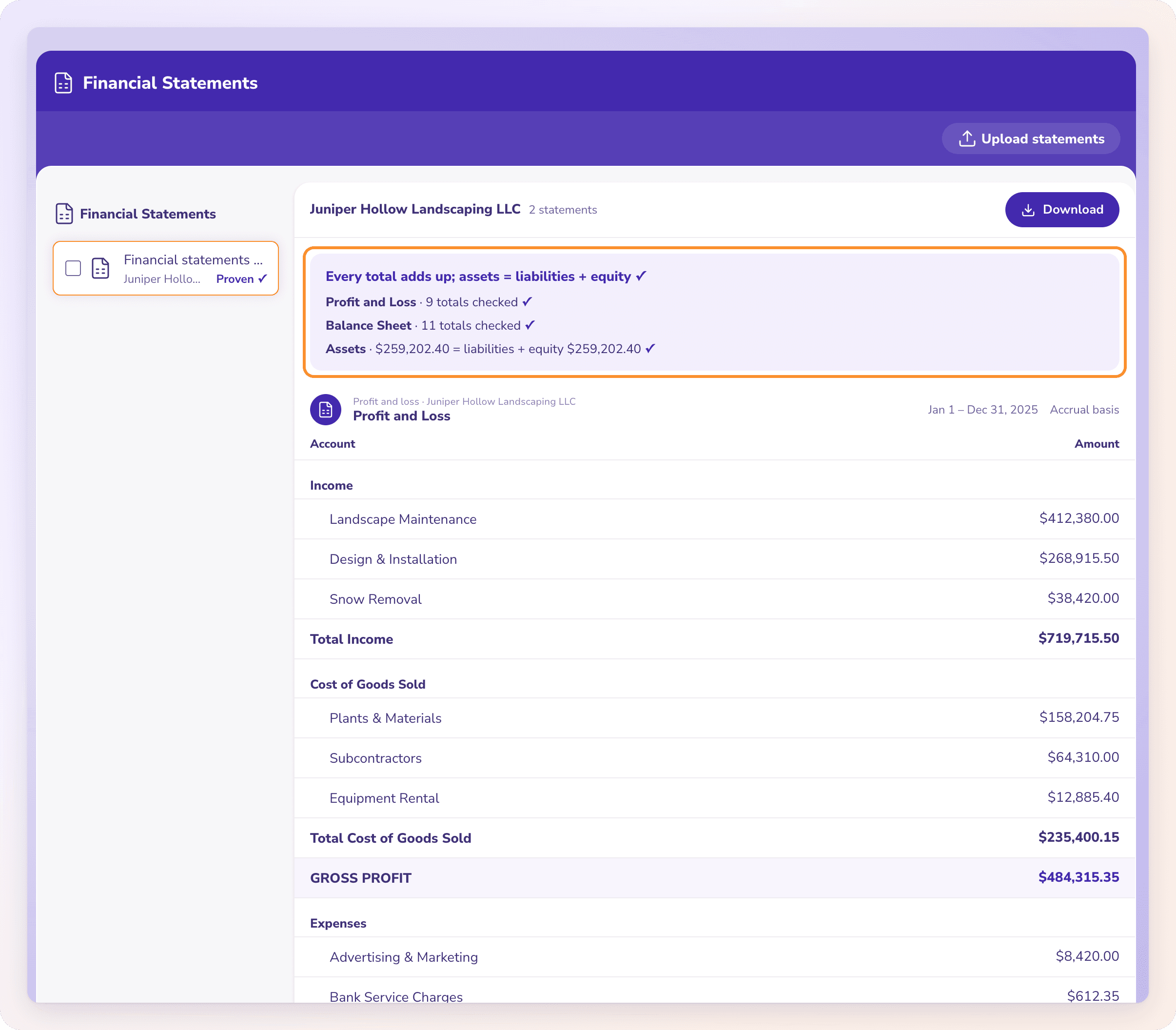
What each statement shows
Each statement gets its own section:
The heading: the statement type (Profit and loss, Balance sheet, Cash flow or Financial statement), the company and the statement's title.
The date, as printed: "As of {date}", a date range, "Through {date}" or "From {date}".
The basis, when printed, for example "Accrual basis" or "Cash basis".
The lines, with Account and the amount column (named as printed, or Amount). Lines are indented by level, and totals are in bold.
How financial statements are proven
ZeraBooks Convert checks every total against the lines it adds up, and checks the statement's own formulas. On a balance sheet, it also checks that assets equal liabilities plus equity.
The banner at the top gives the result:
| Banner | What it means |
|---|---|
| "Every total adds up ✓" (with "; assets = liabilities + equity" for a balance sheet) | Every total checks out. Each statement shows how many totals were checked, for example "12 totals checked ✓". |
| "Needs a look before you download." | A total doesn't match its lines. A line for each one says which total, what the lines come to and what the statement prints. |
| "No totals could be checked in these statements." | There were no totals to check the lines against. |
| "No financial statements were found in this document." | Convert didn't find a financial statement in the PDF. |
A total that doesn't add up is marked with an orange warning triangle.
Editing
Financial statements can't be edited in Convert. If one was read wrongly, upload a clearer copy of the PDF. See When a document can't be read.
Download financial statements
Open the document and click Download in its toolbar, then click Excel or CSV. The file downloads at once, with no dialog. To download several documents in one file, tick them in the list on the left, click Download n together at the top of the list, then choose the file type. Financial statements download in the All details format: a row for every line of each statement, with the columns Statement, Section, Line, Amount and Total. See Download your data.
Frequently Asked Questions
Which financial statements can Convert read?
Profit and loss statements, balance sheets and cash flow statements, as PDFs up to 50 MB each. One PDF can hold several.
What does Convert check on a balance sheet?
Every total against the lines it adds up, and that total assets equal liabilities plus equity.
Can I edit a line on a financial statement?
No. Financial statements can't be edited in Convert. Upload a clearer copy of the PDF if one was read wrongly.
How do I download a financial statement?
Click Download on the document, then Excel or CSV. For several at once, tick them in the list and click Download n together. With All details, every line of each statement is a row, with the statement's name in the Statement column.
Does Convert build financial statements from my transactions?
No. Convert reads financial statements you upload. Building reports from your books is part of the ZeraBooks General Ledger.
What does "No totals could be checked in these statements." mean?
The statements print no totals to prove their lines against. Compare them with the PDF before you use them.
Learn more about Bank statement converter: Statements to checked Excel or CSV, split by account and cardholder.
Still stuck? A real person reads every message—come say hello.