LIMITED OFFERUnlimited conversions — Free 7-day trial — Cancel anytimeStart trial
HomeProductsInvestment Statements
99.6% AccuracyAny BrokerageAuto Journal Entries

Investment Statement Converter: Extract Holdings, Transactions, and Journal Entries from Brokerage PDFs

Zera Books converts investment and brokerage statement PDFs into structured Excel data with 99.6% accuracy. Extract holdings, transactions, and dividends — then auto-generate journal entries for QuickBooks and Xero. Supports Fidelity, Schwab, Vanguard, and every major brokerage. $79/month unlimited.

TL;DR

What the investment statement converter does:

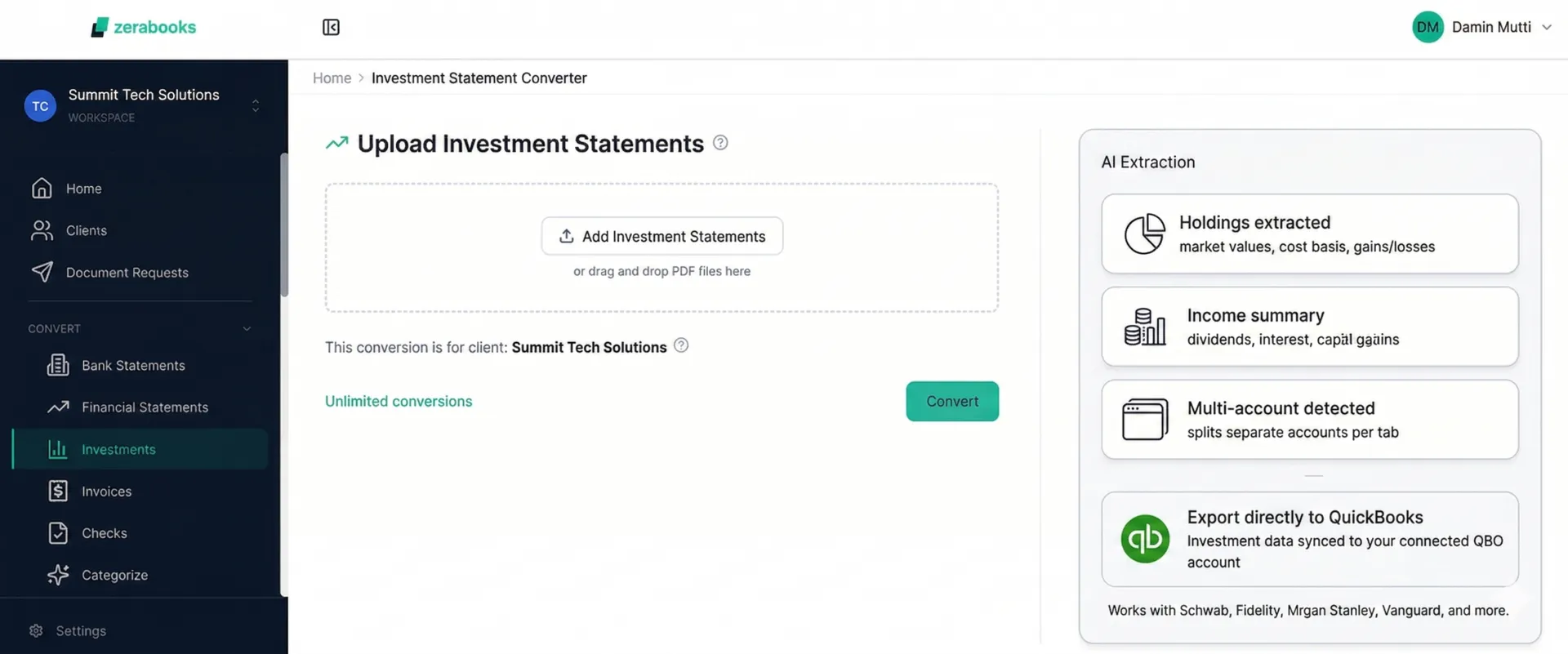
  • Extracts holdings, transactions, dividends, and capital gains from any brokerage PDF — Fidelity, Schwab, Vanguard, and 100+ more — with 99.6% accuracy
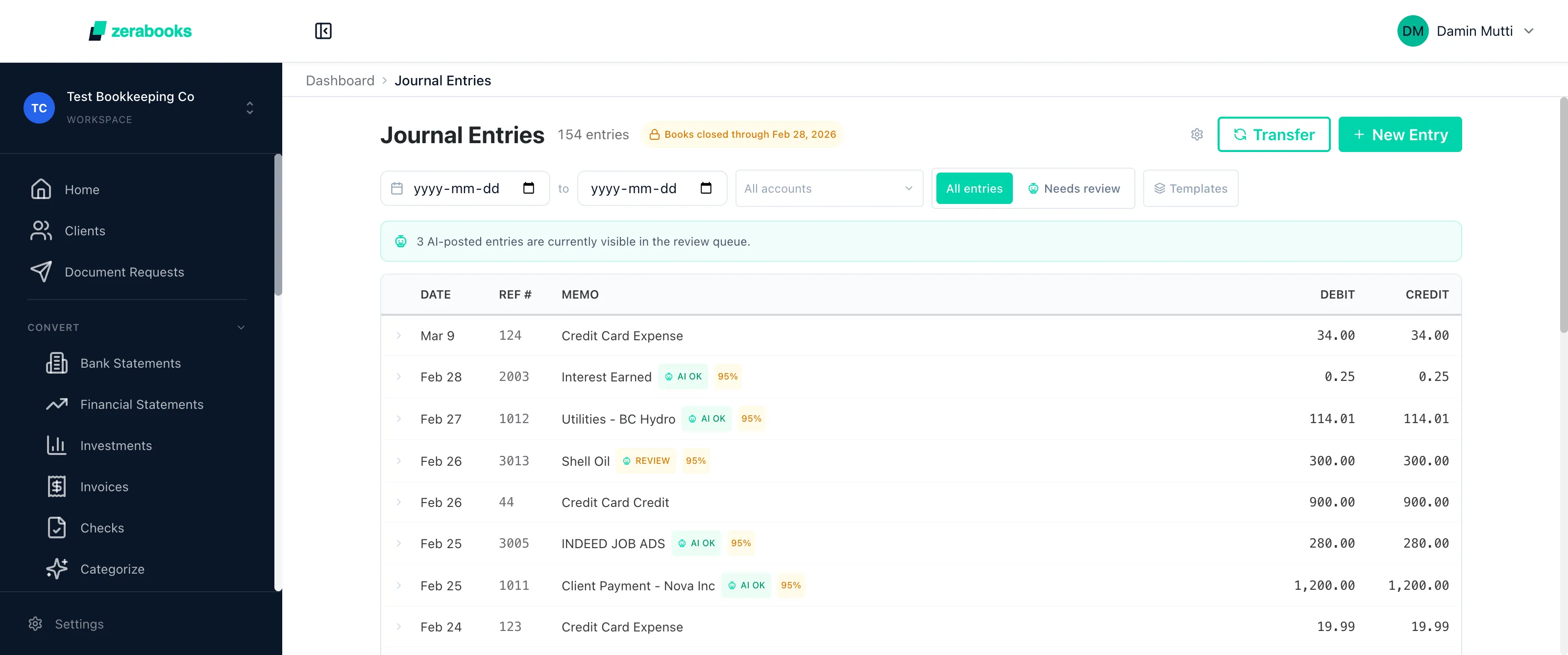
  • Auto-generates journal entries (Buy, Sell, Dividend, Interest, Fee) pre-formatted for QuickBooks and Xero
  • Categorizes income by tax type — qualified vs ordinary dividends, short vs long-term gains, tax-exempt interest, foreign tax paid
  • $79/month unlimited. No templates. No per-page fees. No volume limits.

Why it matters for accountants:

  • Save 8-12 hours per week on investment data entry and journal entry creation
  • Client dashboard organizes investment conversions by client with full audit history
  • AES-256 encryption, auto-delete after 30 days, no data retention without permission
1

What Is the Investment Statement Converter?

The Zera Books investment statement converter is an AI-powered tool that transforms brokerage and investment account PDFs into structured, import-ready Excel and CSV data. It extracts holdings tables, transaction histories, dividend and interest income, capital gains and losses, and fee schedules from any brokerage statement format — then auto-generates double-entry journal entries for QuickBooks and Xero.

Powered by Zera AI, the same proprietary model trained on 3.2 million financial documents, the investment converter achieves 99.6% field-level accuracy on holdings data, transaction amounts, and income figures. It dynamically adapts to any brokerage format — Fidelity, Schwab, Vanguard, TD Ameritrade, or any other institution — without pre-built templates or manual configuration.

For CPAs and accountants managing client investment accounts, this eliminates the manual process of retyping brokerage data into spreadsheets and creating journal entries by hand. A single quarterly statement that previously took 45-60 minutes of manual work is processed in under 30 seconds.

2

Supported Brokerages and Statement Formats

Zera Books processes investment statements from every major brokerage in the United States and internationally. Unlike template-based tools that only support 10-20 pre-configured formats, Zera AI dynamically adapts to any brokerage statement layout on the first upload — including monthly statements, quarterly reports, year-end tax summaries, and consolidated account reviews.

Supported input formats include digital PDFs, scanned documents, multi-page statements, and password-protected files. The converter handles statements with multiple account types (brokerage, IRA, Roth IRA, 401(k), trust) within a single PDF.

Fidelity
Charles Schwab
Vanguard
TD Ameritrade
E*TRADE
Robinhood
Interactive Brokers
Merrill Edge
Morgan Stanley
Wells Fargo Advisors
Raymond James
Edward Jones

Plus any other brokerage that issues PDF statements. Zera AI adapts to new formats automatically.

3

Six Core Capabilities of the Investment Statement Converter

AI-Powered Data Extraction

Zera AI extracts every data point from investment statements — account numbers, statement periods, holdings tables, transaction histories, income summaries, and fee schedules — from any brokerage PDF format with 99.6% field-level accuracy.

Holdings and Asset Allocation

Extracts complete holdings data including ticker symbols, CUSIP numbers, share quantities, market values, cost basis, unrealized gains and losses, and asset allocation percentages. Output is structured for portfolio analysis and client reporting.

Tax-Aware Income Categorization

Automatically categorizes investment income into qualified dividends, ordinary dividends, short-term capital gains, long-term capital gains, tax-exempt interest, and foreign tax paid. Pre-sorts income types for tax preparation workflows.

Auto-Generated Journal Entries

Generates double-entry journal entries for every investment transaction — Buy, Sell, Dividend, Interest, and Fee — with proper debit and credit accounts pre-mapped for QuickBooks and Xero import.

Multi-Account Detection

Automatically detects and separates multiple investment accounts within a single PDF — brokerage, IRA, Roth IRA, 401(k), and trust accounts — each exported to its own Excel sheet with correct account identification.

Batch Processing

Upload 50+ investment statements at once for end-of-quarter or year-end processing. Each statement is individually parsed and exported, with batch progress tracking and bulk download.

4

How It Works: Investment Statement to Excel in 4 Steps

1

Upload Brokerage PDFs

Drag and drop investment statement PDFs from any brokerage — digital or scanned, single or multi-page, password-protected or plain. Upload individual statements or batch-process 50+ at once for quarter-end workflows.

2

AI Extracts Holdings, Transactions, and Income

Zera AI identifies the document structure and extracts holdings tables, transaction histories, dividend and interest income, capital gains and losses, and fee schedules — all in under 30 seconds per statement.

3

Review with Visual Summaries

Review extracted data with asset allocation breakdowns, income category summaries, and transaction timelines. Edit any field directly before export. Confidence scores flag uncertain extractions for manual review.

4

Export Data and Journal Entries

Download holdings, transactions, and income data in Excel or CSV. Export auto-generated journal entries directly to QuickBooks or Xero via API integration, or download pre-formatted QBO/IIF files.

Processing Speed:

Under 30 seconds per statement from upload to export. Batch mode processes 50+ statements simultaneously. For a CPA firm managing 30 investment clients, that means processing an entire quarter of brokerage statements in under 15 minutes — including journal entries.

5

Comparison: Zera Books vs Manual Entry vs Template Tools

Most accountants process investment statements manually or use basic PDF-to-Excel tools that require per-brokerage templates. Here is how Zera Books compares on the metrics that matter for investment accounting workflows.

FeatureManual ExcelTemplate ToolsZera Books
Extraction Method
Retype from PDF into spreadsheet
Pre-built templates per brokerage
Zera AI — dynamic adaptation, zero templates
Brokerage Support
Any (manual effort)
10-20 supported formats
Any brokerage worldwide, auto-detected
Holdings Extraction
Manual copy-paste per position
Basic table extraction
Full holdings with cost basis, gains/losses, allocation
Journal Entry Generation
Manually create each entry
Not available
Auto-generated Buy/Sell/Dividend/Interest/Fee entries
Tax Categorization
CPA sorts manually at year-end
Not available
Qualified vs ordinary dividends, short vs long-term gains
Multi-Account Detection
Split accounts by hand
One account per upload
Auto-detects brokerage, IRA, 401(k) in one PDF
Pricing
Staff time ($40-80/hr)
$0.10-0.50 per page
$79/month unlimited — no per-page fees
Accuracy
~95% (human error)
85-93% (template mismatch)
99.6% field-level accuracy
6

Auto-Generated Journal Entries for QuickBooks and Xero

Zera Books is the only investment statement converter that automatically generates double-entry journal entries from extracted transaction data. Every Buy, Sell, Dividend, Interest, and Fee transaction is converted into a properly formatted journal entry with correct debit and credit accounts — ready to import into QuickBooks Online or Xero via direct API integration.

This eliminates the most time-consuming part of investment bookkeeping: manually creating journal entries for each transaction. For a client with 50 investment transactions per quarter, that is 50 journal entries auto-generated in seconds instead of hours.

Buy
Debit

Investment Asset (e.g., Marketable Securities)

Credit

Cash / Brokerage Account

Example: Buy 100 shares AAPL @ $185.00

Sell
Debit

Cash / Brokerage Account

Credit

Investment Asset + Realized Gain/Loss

Example: Sell 50 shares MSFT @ $420.00 (cost basis $380.00)

Dividend
Debit

Cash / Brokerage Account

Credit

Dividend Income (qualified or ordinary)

Example: $1,250.00 qualified dividend from VTI

Interest
Debit

Cash / Brokerage Account

Credit

Interest Income (taxable or tax-exempt)

Example: $340.00 interest from VBTLX bond fund

Fee
Debit

Investment Expense / Advisory Fee

Credit

Cash / Brokerage Account

Example: $75.00 quarterly advisory fee

7

Tax-Aware Income Categorization

Investment income is not one category. Qualified dividends are taxed differently from ordinary dividends. Long-term capital gains have different rates than short-term gains. Tax-exempt interest from municipal bonds is excluded from federal income entirely. During tax season, sorting investment income into the correct tax categories is one of the most tedious parts of preparing client returns.

Zera AI automates this categorization. Every dividend, interest payment, and capital gain is classified into the correct tax category as part of the extraction process — not as an afterthought. The output maps directly to Schedule B, Schedule D, and Form 1116 line items.

Qualified Dividends

Dividends from domestic and qualifying foreign corporations held for 60+ days. Taxed at long-term capital gains rates (0%, 15%, or 20%).

Ordinary Dividends

All dividends not meeting qualified criteria, including REIT distributions and money market fund dividends. Taxed as ordinary income.

Short-Term Capital Gains

Gains from securities held less than one year. Taxed as ordinary income. Zera AI calculates holding period from buy date.

Long-Term Capital Gains

Gains from securities held one year or longer. Taxed at preferential rates (0%, 15%, or 20%). Identified automatically from transaction dates.

Tax-Exempt Interest

Interest from municipal bonds and tax-exempt funds. Excluded from federal taxable income. Reported separately for state tax purposes.

Foreign Tax Paid

Taxes withheld by foreign governments on international investment income. Eligible for Foreign Tax Credit on Form 1116.

8

Frequently Asked Questions

What brokerages does the Zera Books investment statement converter support?

Zera Books dynamically processes investment statements from any brokerage. This includes Fidelity, Charles Schwab, Vanguard, TD Ameritrade, E*TRADE, Robinhood, Interactive Brokers, Merrill Edge, Morgan Stanley, Wells Fargo Advisors, Raymond James, Edward Jones, and any other brokerage that issues PDF statements. Zera AI adapts to each format automatically — no templates or pre-configuration required.

Can it extract holdings and cost basis from brokerage PDFs?

Yes. Zera AI extracts complete holdings data from investment statement PDFs including ticker symbols, CUSIP numbers, share quantities, current market values, original cost basis, unrealized gains and losses, and asset allocation percentages. This data is structured in Excel with one row per position for easy portfolio analysis and client reporting.

How does the auto-generated journal entry feature work?

Zera Books automatically generates double-entry journal entries for five investment transaction types: Buy, Sell, Dividend, Interest, and Fee. Each entry includes the correct debit and credit accounts mapped to your QuickBooks or Xero chart of accounts. For example, a stock purchase debits Marketable Securities and credits Cash. Sell entries include realized gain or loss calculations. Entries can be exported directly via API integration or as QBO/IIF files.

What tax categories does the income categorization cover?

Zera AI categorizes investment income into six tax-relevant categories: qualified dividends, ordinary dividends, short-term capital gains, long-term capital gains, tax-exempt interest, and foreign tax paid. This pre-sorting saves significant time during tax preparation because income types are already separated for Schedule B, Schedule D, and Form 1116 reporting.

Can I process multiple investment accounts from one PDF?

Yes. Zera AI automatically detects multiple investment accounts within a single PDF statement — including brokerage accounts, IRAs, Roth IRAs, 401(k) accounts, and trust accounts. Each account is separated into its own Excel sheet with correct account identification, holdings, and transaction data. This eliminates the manual work of splitting combined statements.

How much does the investment statement converter cost?

Investment statement conversion is included with Zera Books at $79 per month for unlimited conversions. There are no per-page fees, no volume limits, and no overage charges. The same subscription covers bank statements, financial statements, invoices, and checks. You can try it for one week to test with your own brokerage PDFs before committing.

Ashish Josan, Manager, CPA at Manning Elliott
My clients send me all kinds of messy PDFs from different banks. This tool handles them all and saves me probably 10 hours a week that I used to spend on manual entry.

Ashish Josan

Manager, CPA at Manning Elliott

Ready to Transform Your Investment Workflow?

Stop spending hours retyping brokerage data and creating journal entries by hand. Zera Books processes any investment statement in under 30 seconds with 99.6% accuracy — and exports directly to QuickBooks or Xero.

Try for one week