Answer Autopilot's questions
When ZeraBooks can't tell, it asks in Needs you with one-tap answers, its best guess first. Here is how to answer, skip, and what each kind of question means.
Find the questions
In the left navigation, click Autopilot.
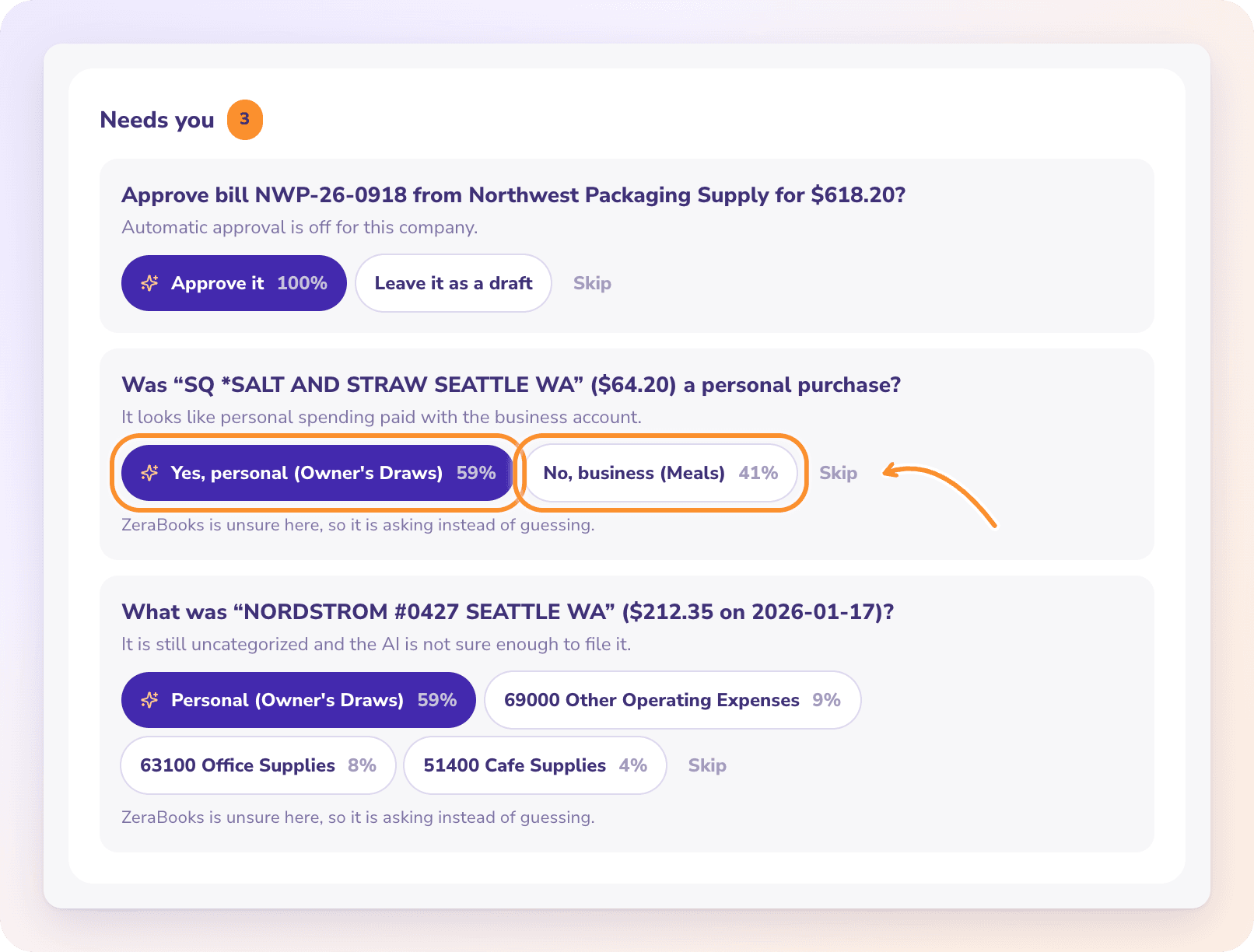
Look at Needs you. The badge shows how many questions are open. The same count appears in the Autopilot header and on the Dashboards strip.
When nothing is waiting, the card reads "Nothing needs you. ZeraBooks will ask here if it ever cannot tell."
Answer a question
Each question shows what ZeraBooks needs to know, a short reason, and up to six answers with how sure it is about each one.
Read the question and the grey reason line under it.
Click the answer that's right. The first answer, in purple with a sparkle, is ZeraBooks' best guess.
A message confirms what was done, and the question leaves the list.
Your answer is applied as your own decision, so it goes ahead even where Autopilot wouldn't have acted on its own. It still goes through the same checks as your own edits.
If ZeraBooks' best guess is below 60%, the card says "ZeraBooks is unsure here, so it is asking instead of guessing."
Skip closes the question for good. ZeraBooks won't ask about that item again, and there's no way to bring a skipped question back. If you're not sure yet, leave the question open instead.
Questions you may see
| Question | What it's about |
|---|---|
| What was "…" ($… on …)? | Which category a transaction belongs to. Your answer can also file similar transactions. |
| Was "…" a personal purchase? | Whether to move it to Owner's Draws |
| Was "…" equipment the business will use for years? | Whether to record a purchase of $1,000 or more as an asset |
| Approve … for …? | Whether to post a bill or invoice |
| Which payment already covers …? / Which deposit settles …? | Which bank line pays a bill or invoice |
| Is the … a part payment of …? | Whether a smaller payment partly pays a document |
| Close the … left on … as a …? | Whether to close a small leftover balance |
| Send a payment reminder to …? | Whether to email a customer about an overdue invoice |
| Add "…" as a vendor or customer? / Are A and B the same business? | Creating or merging vendors and customers |
| Record … of depreciation for …? / What interest rate does … charge? | Month-end entries. See Month-end entries. |
| Did … bill you in …? | A recurring bill that didn't show up this month |
| Close the books through …? | Locking months that are reconciled and signed off |
Frequently Asked Questions
Why did ZeraBooks ask instead of doing it?
It wasn't sure enough for your mode and for how much a wrong answer would cost. Riskier actions, like closing a month or emailing a customer, need more certainty. See Choose how much ZeraBooks does.
What does Skip do?
It closes the question permanently. ZeraBooks won't ask about the same item again. Nothing else changes in your books.
What does "That question was already answered." mean?
The question was answered already, for example in another browser tab. Refresh the page to see the current list.
What does "This question can no longer be answered here." mean?
The item the question was about has changed since it was asked, for example the transaction was matched or the document was approved. ZeraBooks withdraws the question and refreshes the list.
Why can't my answer be applied to a closed month?
The message "That date is in a closed period. Reopen the books from Reconciliations first." means the answer would change a month you've closed. Reopen the books, answer, then close them again. See Close and reopen the books.
Can I change my answer later?
Yes, if the answer changed your books. That change appears in Done by AI like any other action. Click Undo there, then correct the item yourself. See Review and undo AI actions.
Learn more about AI bookkeeping: Autopilot and Ask Zera keep the books inside a real general ledger.
Still stuck? A real person reads every message—come say hello.