Choose how much ZeraBooks does on its own
Pick Cautious, Balanced or Autopilot to set how sure ZeraBooks must be before it acts, and use four switches to decide what it may do by itself.
Change the mode
In the left navigation, click Autopilot.
Find the card How much ZeraBooks does on its own.
Click Cautious, Balanced or Autopilot. The change is saved immediately and applies from the next pass.
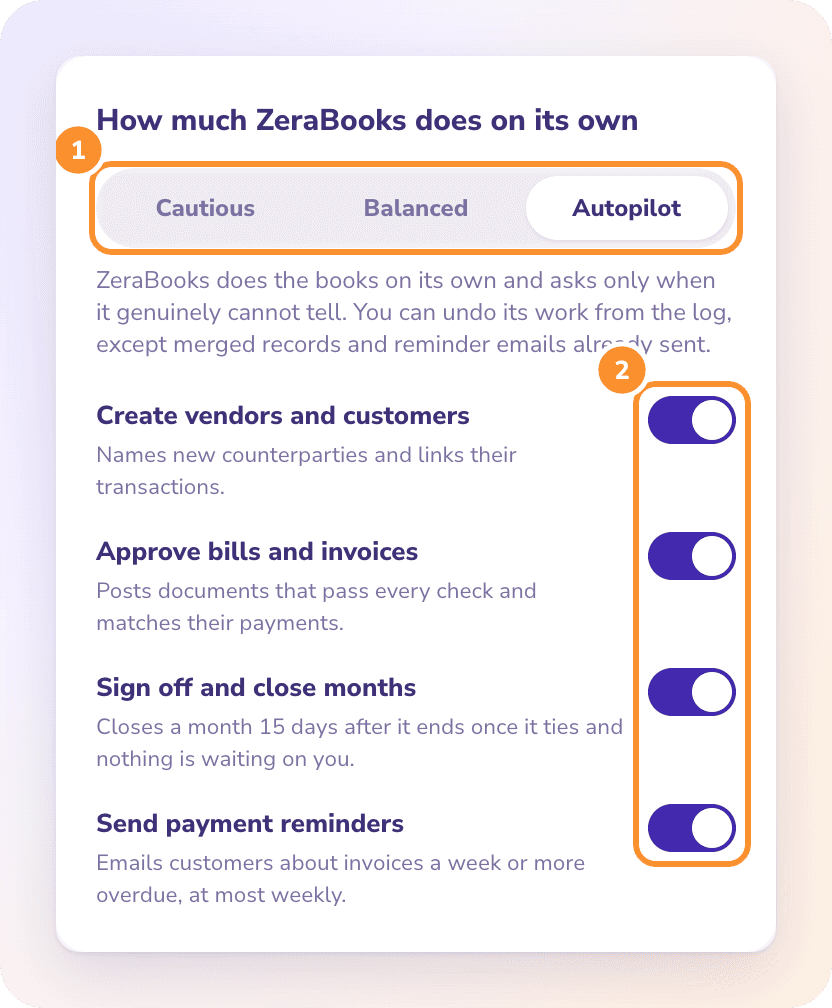
| Mode | What it means |
|---|---|
| Cautious | ZeraBooks suggests and prepares, and acts on its own only when it is all but certain. You approve the rest. |
| Balanced | ZeraBooks handles routine work automatically and asks before anything unusual, closing months or contacting customers. |
| Autopilot | ZeraBooks does the books on its own and asks only when it genuinely cannot tell. You can undo its work from the log, except merged records and reminder emails already sent. |
New companies start in Autopilot mode with all four switches on.
How sure it must be
Every decision has a risk level. A wrong category costs a quick fix, while a wrong month close or a reminder email reaches further, so riskier decisions need more certainty.
Each cell shows two lines: at or above the first, ZeraBooks acts; between the two, it acts and marks the action For a glance; below the second, it asks you.
| Mode | Low risk | Medium risk | High risk |
|---|---|---|---|
| Autopilot | 85% / 60% | 90% / 70% | 95% / 85% |
| Balanced | 92% / 75% | 95% / 85% | Always asks |
| Cautious | 97% / 90% | 99% / 95% | Always asks |
Low risk: categorizing a transaction, linking or creating a vendor or customer, matching a payment to a document, signing off a reconciled month, applying a correction to similar transactions.
Medium risk: merging duplicates, moving a personal purchase to Owner's Draws, recording equipment as an asset, approving a bill or invoice, closing a small short payment, splitting a deposit across invoices, spreading a prepaid expense, recording depreciation, splitting loan interest, correcting an inconsistent category.
High risk: closing a month and sending a payment reminder.
Turn individual jobs on or off
Under the mode, four switches decide what ZeraBooks may do by itself. Each one saves as soon as you click it.
| Switch | When it's on | When it's off |
|---|---|---|
| Create vendors and customers | Names new vendors and customers and links their transactions | Asks before adding one |
| Approve bills and invoices | Posts documents that pass every check and matches their payments | Asks before approving: "Automatic approval is off for this company." |
| Sign off and close months | Signs off tied months and closes a month 15 days after it ends, once it ties and nothing is waiting on you | Doesn't sign off or close anything. You do it in Reconciliations. |
| Send payment reminders | Emails customers about invoices a week or more overdue, at most weekly | Asks before each reminder |
Note: Reminders are sent automatically only in Autopilot mode. In Balanced and Cautious, ZeraBooks always asks first. See Automatic payment reminders.
Frequently Asked Questions
What are the default settings?
Autopilot mode with all four switches on: create vendors and customers, approve bills and invoices, sign off and close months, and send payment reminders.
Will ZeraBooks email my customers without asking?
Only in Autopilot mode with Send payment reminders on, for an invoice at least 7 days overdue that was emailed from ZeraBooks before, and only if your bank activity is no more than 35 days old. Otherwise it asks you first.
When does ZeraBooks close a month on its own?
At least 15 days after the month ends, once every account is reconciled and signed off and nothing is waiting on you: no open questions, flagged categories or Uncategorized transactions. Sign off and close months must be on. Only Autopilot mode closes on its own; in Balanced and Cautious it always asks first.
Why doesn't Autopilot close my books even though everything ties?
Check that Sign off and close months is on, that the month ended at least 15 days ago, and that nothing is waiting in Needs you. ZeraBooks also doesn't close books that are protected with a closing password; close them yourself in Reconciliations.
What does "The setting could not be saved." mean?
The change didn't reach ZeraBooks, usually because of a connection problem. The page reloads your saved settings. Try again.
Does changing the mode affect actions already taken?
No. The mode applies to future passes. Past actions stay in Done by AI, where you can still undo them.
Learn more about AI bookkeeping: Autopilot and Ask Zera keep the books inside a real general ledger.
Still stuck? A real person reads every message—come say hello.