Review and undo AI actions
Everything ZeraBooks does on its own is listed in Done by AI with how sure it was. Here is how to check the actions flagged for a glance, undo one, and what can't be undone.
Read the log
In the left navigation, click Autopilot.
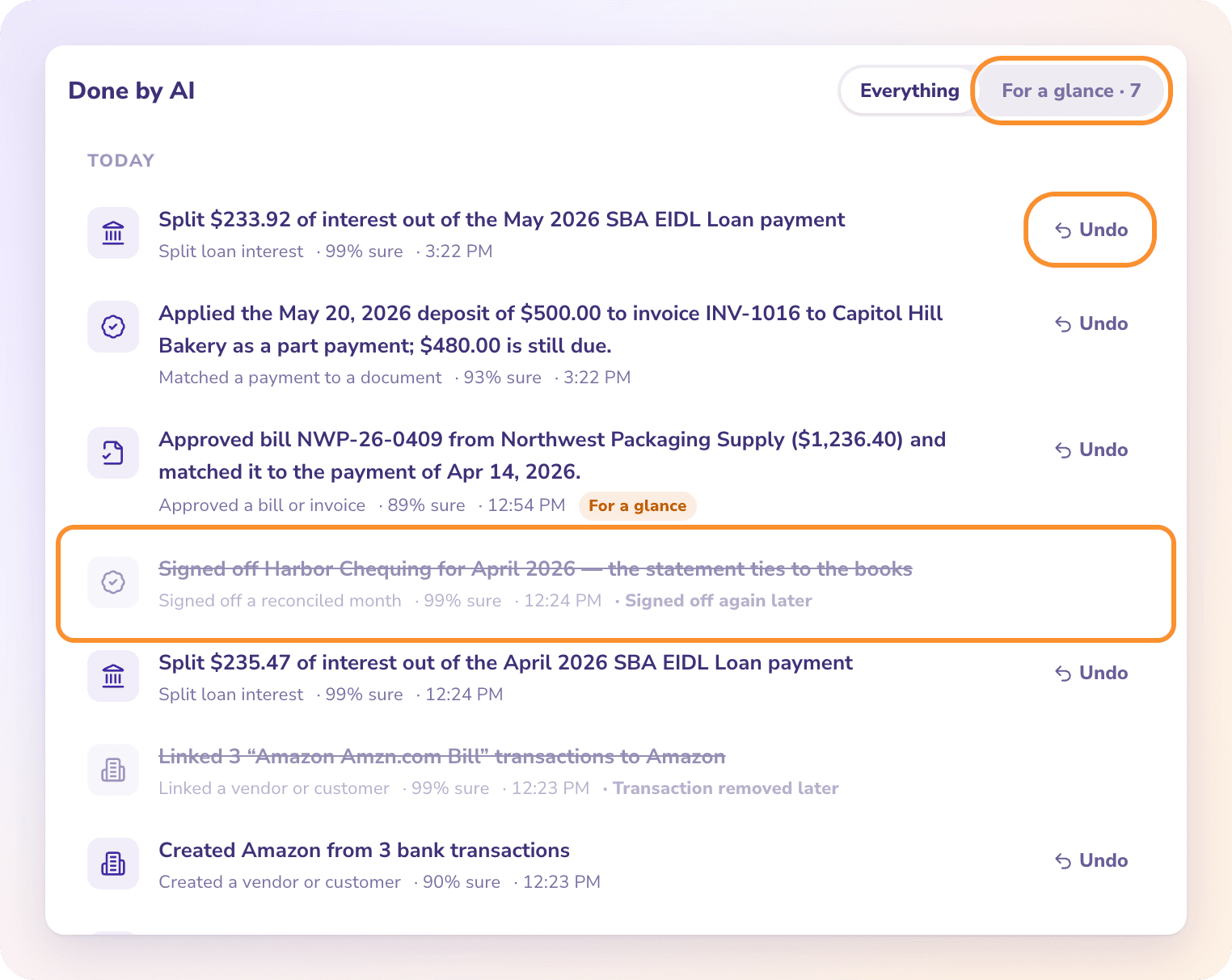
Scroll to Done by AI. Actions are grouped by day (Today, Yesterday, then the date), newest first. The latest 200 actions are shown.
Each row shows what was done, the kind of action (for example Categorized a transaction or Recorded depreciation), how sure ZeraBooks was ("· 94% sure") and the time.
Check the actions flagged for a glance
Some actions were done with less certainty. They carry an orange For a glance badge.
At the top of Done by AI, click For a glance. The number next to it is how many are waiting.
Check each one. If it's right, there's nothing to do. If it's wrong, click Undo.
Click Everything to see the whole log again.
When nothing is flagged, the filter shows "Nothing is waiting for a glance."
Undo an action
Find the action in Done by AI.
Click Undo on its row.
The message "Undone." confirms it. The row is struck through and marked · Undone.
What undo does depends on the action:
| Action | What Undo does |
|---|---|
| A category change | Puts each transaction back to its previous category. Transactions you've changed since are left alone. |
| A vendor or customer it created | Deactivates it. It isn't deleted. |
| A journal it recorded (depreciation, loan interest, a prepaid spread) | Deletes the journal |
| Closing the books | Reopens the books to the previous closing date |
| Signing off a month | Removes the sign-off, so the month is open again in Reconciliations |
| Approving a bill or invoice | Moves it back to a draft |
| Matching a payment to a bill or invoice | Removes the match. A match you've changed since is left alone. |
An action you undo is not redone on the next pass.
Two actions can't be undone and have no Undo button: Merged duplicate parties (merged records stay merged) and Sent a payment reminder (an email can't be unsent).
Actions changed later
If you or someone else changed the result outside Autopilot, the row is struck through with a label such as Category changed later, Voided later, Sign-off removed later or Books reopened later. There's nothing left to undo, so the Undo button is gone.
If the log hadn't refreshed yet and you click Undo, ZeraBooks explains instead, for example "Nothing to undo — this document was voided since."
Frequently Asked Questions
Can I undo everything Autopilot does?
Almost. Everything can be undone from the log except merged vendors or customers and payment reminders already emailed. Those two have no Undo button.
Will Autopilot redo something I undid?
No. An undone action is treated as your answer, so later passes leave that item alone.
Why does an action say "Category changed later" with no Undo?
The category was changed outside Autopilot after it acted, so its change is no longer in your books. There's nothing left to undo.
What does "For a glance" mean?
ZeraBooks did it, but it was less certain, so it flags the action for you to check. Use the For a glance filter to see only those.
What does "That action could not be undone." mean?
The undo failed, often because the change would fall in a closed period ("That date is in a closed period. Reopen the books from Reconciliations first.") or the connection dropped. Reopen the books if needed and try again.
Does undoing a created vendor delete it?
No. It's deactivated, so it stays on anything it already touches and stops being offered when you pick a vendor.
Learn more about AI bookkeeping: Autopilot and Ask Zera keep the books inside a real general ledger.
Still stuck? A real person reads every message—come say hello.