Export closing reports from your old software
The exact clicks to export the trial balance and the unpaid invoices and bills reports from QuickBooks Online, QuickBooks Desktop, Xero and other software.
Which reports you need
Opening books asks for up to three reports, all dated on the day your old books close:
| Report in ZeraBooks | What it is | When you need it |
|---|---|---|
| Trial balance | Every account and its balance on the closing date | Always |
| Unpaid customer invoices | Invoices customers hadn't paid yet (an accounts receivable aging detail report) | Only if customers still owed you money |
| Unpaid vendor bills | Bills you hadn't paid yet (an accounts payable aging detail report) | Only if you still owed vendors money |
Upload the trial balance first. ZeraBooks reads it and then shows only the unpaid reports you need. If nothing was owed either way, it says "Nothing was owed either way on {date}, so that's everything."
Upload the reports
On the Closing reports stage, pick your software under Your current accounting software.
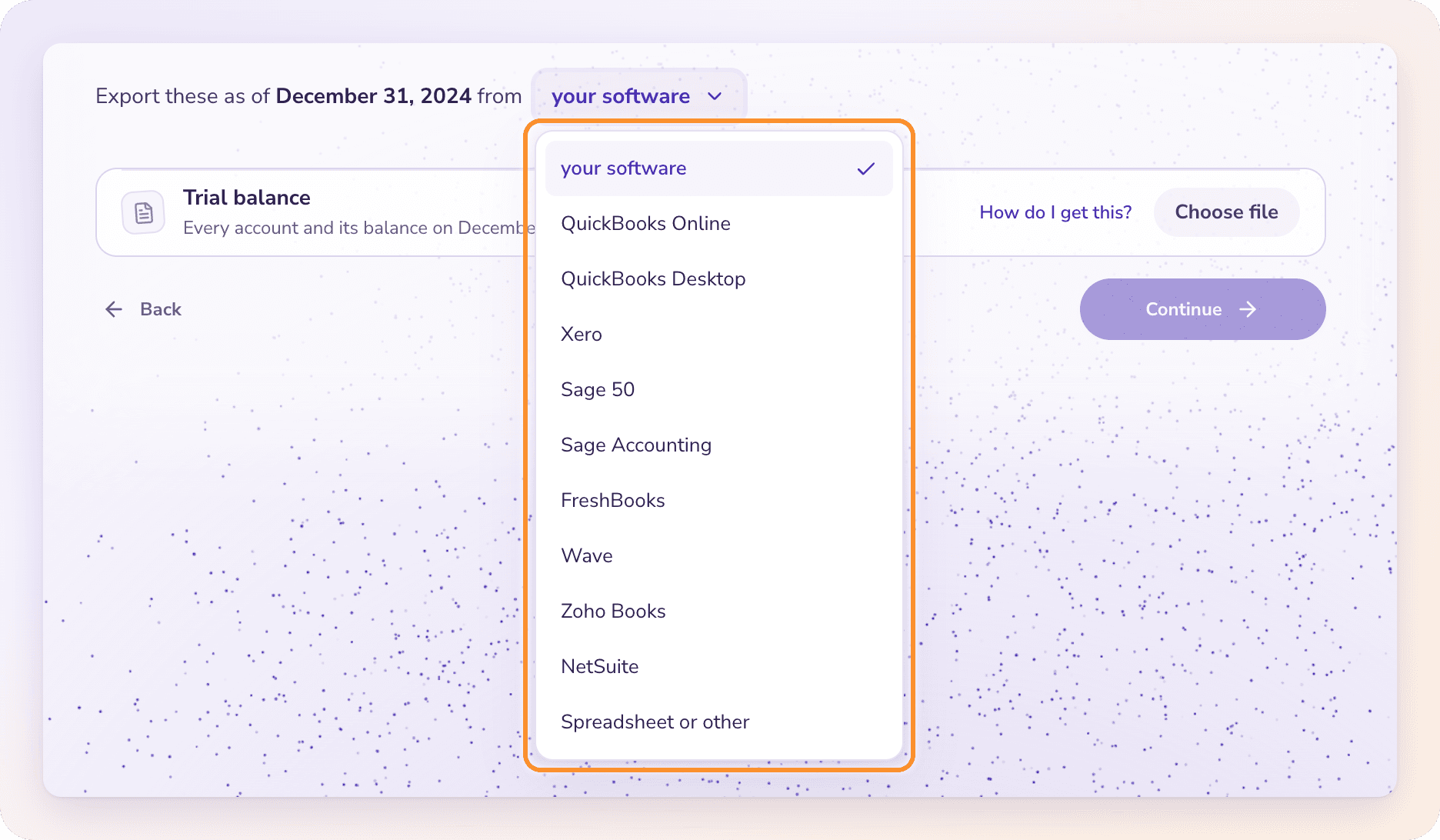
On a report's row, click How do I get this? for the exact clicks in that software, with a link to the software's own help.
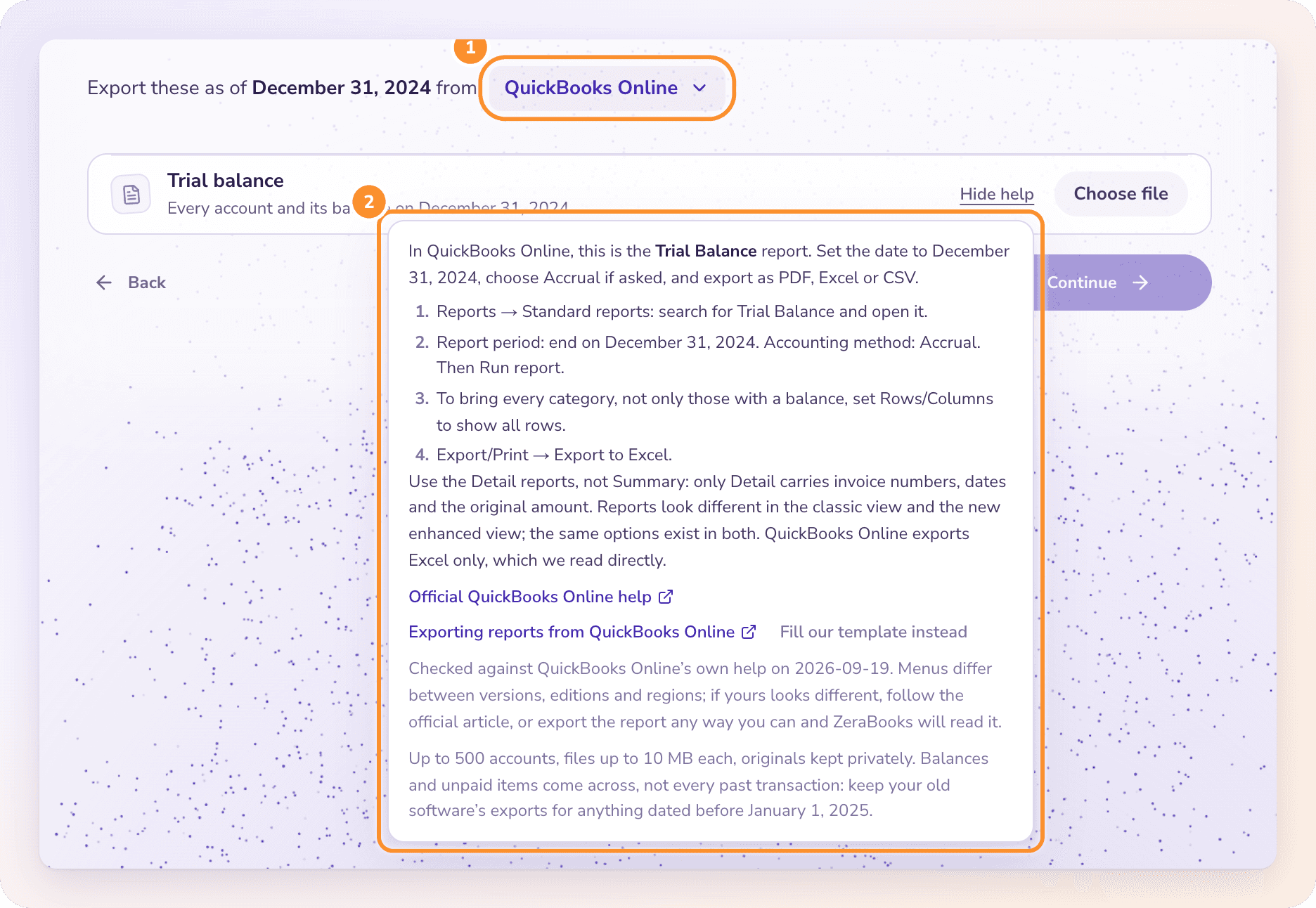
Export the report from your old software as of the closing date.
Back in ZeraBooks, click Choose file on that row and select the export. ZeraBooks reads it and shows what it found, for example the number of accounts and the debit and credit totals.
Repeat for each report shown, then click Continue (in setup) or Read reports.
Files can be PDF, CSV or Excel (.xlsx), up to 10 MB each and 20 MB together, with up to 500 accounts and 2,000 unpaid documents. Any layout works.
Export steps by software
These are the steps the How do I get this? guides show. Use the detail versions of the aging reports, not the summaries: only the detail reports list each invoice or bill with its number, date and original amount.
Trial balance
Reports › Standard reports: search for Trial Balance and open it.
Report period: end on your closing date. Accounting method: Accrual. Then Run report.
To bring every category, not only those with a balance, set Rows/Columns to show all rows.
Export/Print › Export to Excel.
Unpaid customer invoices
Reports › Standard reports › Who owes you › Accounts receivable aging detail.
Set As of to your closing date.
Customize › General options › Aging: choose Report date, then Run report.
Export/Print › Export to Excel.
Unpaid vendor bills
Reports › Standard reports › What you owe › Accounts payable aging detail.
Set As of to your closing date.
Customize › General options › Aging: choose Report date, then Run report.
Export/Print › Export to Excel.
Reports look different in the classic view and the new enhanced view; the same options exist in both. QuickBooks Online exports Excel only, which ZeraBooks reads directly.
Trial balance
Reports › Accountant & Taxes › Trial Balance.
Customize Report › Display: leave From blank and set To to your closing date.
Report Basis: Accrual, then OK.
Excel › Create New Worksheet.
Unpaid customer invoices
Reports › Customers & Receivables › A/R Aging Detail.
Customize Report › Display: set To to your closing date.
Make sure the Amount and Open Balance columns are shown, then OK.
Excel › Create New Worksheet.
Unpaid vendor bills
Reports › Vendors & Payables › A/P Aging Detail.
Customize Report › Display: set To to your closing date.
Make sure the Amount and Open Balance columns are shown, then OK.
Excel › Create New Worksheet.
Leaving From blank and setting only To gives a clean as-of snapshot.
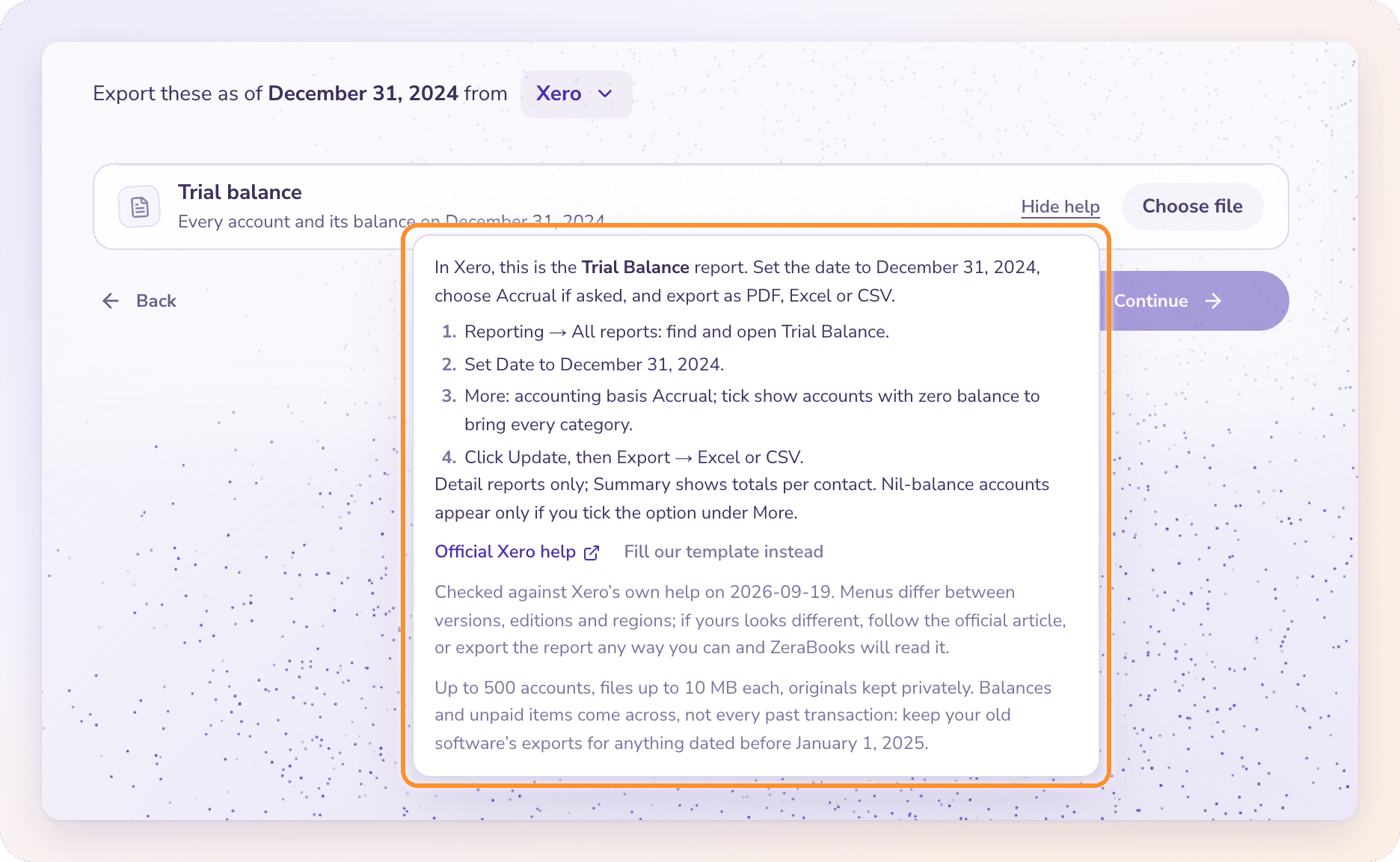
Trial balance
Reporting › All reports: find and open Trial Balance.
Set Date to your closing date.
More: accounting basis Accrual; tick the option to show accounts with a zero balance to bring every category.
Click Update, then Export › Excel or CSV.
Unpaid customer invoices
Reporting › All reports: find and open Accounts Receivable Aging Detail.
Set Date to your closing date.
Columns: show Invoice Date and Due Date alongside the invoice number, then Update.
Export › Excel or CSV.
Unpaid vendor bills
Reporting › All reports: find and open Accounts Payable Aging Detail.
Set Date to your closing date.
Columns: show Invoice Date and Due Date alongside the bill number, then Update.
Export › Excel or CSV.
Use the detail reports only; the summary shows totals per contact.
Pick your software in Your current accounting software to see its full steps in How do I get this?. The trial balance for each:
Sage 50
Reports & Forms › General Ledger › General Ledger Trial Balance. In Options, set the date to your closing date, then OK. Click the Excel icon › Create a new workbook › OK. For unpaid items use Aged Receivables and Aged Payables with Summarize report unchecked.
Sage Accounting
Reports › Trial Balance. Set the period to end on your closing date, then Calculate, then Export › CSV. For unpaid items use Accounts Receivable Aging and Accounts Payable Aging, Detailed. The UK and Ireland editions call these Aged Debtors and Aged Creditors.
FreshBooks
Reports › Accounting Reports › Trial Balance. Date range Custom, ending on your closing date; accounting method Billed (Accrual). More Actions › Export for Excel (this saves a CSV). For unpaid items use Invoice Details (unpaid statuses only) and Accounts Payable Aging. Trial Balance needs the Plus plan or higher; Accounts Payable Aging needs Premium or higher.
Wave
Reports › Detailed Reporting › Trial Balance. Set the date to your closing date, Update Report, then Export › CSV. Wave's aged receivables and payables export totals per customer or vendor only, so ZeraBooks' templates are usually the quickest route for unpaid items.
Zoho Books
Reports › Accountant › Trial Balance. As of Date: your closing date; Basis: Accrual; Run Report. Export › Excel or CSV. For unpaid items use Receivables › Aging Details and Payables › Aging Details.
NetSuite
Reports › Financial › Trial Balance. Set As of to your closing date, Refresh, then Export to CSV or Export to Microsoft Excel in the report footer. For unpaid items, the guide walks you through a saved search of open invoices and bills. Exporting needs the Export Lists permission on your role.
Spreadsheet or other
Export the trial balance and aging detail reports from any software as PDF, CSV or Excel; ZeraBooks reads the layout. Or click Fill our template instead on the report's row to download a CSV template:
Trial balance: one row per account with its closing balance in the Debit or Credit column. Debits must equal credits.
Unpaid invoices or bills: one row per open document or credit, with the customer or vendor, number, date, due date, original amount and outstanding amount. A credit is a negative outstanding amount.
Tip: Menus differ between versions, editions and regions. If yours looks different, follow the software's official article linked in How do I get this?, or export the report any way you can. ZeraBooks reads any layout.
Frequently Asked Questions
Do I always need the unpaid invoices and bills reports?
No. Only if money was still owed on the closing date. ZeraBooks reads your trial balance and asks for them only when customers owed you or you owed vendors.
What does "Choose a nonempty PDF, CSV or Excel (.xlsx) export no larger than 10 MiB." mean?
The file is empty, too large or in another format. Export the report again as PDF, CSV or .xlsx, under 10 MB. If all your reports together exceed 20 MB, export a smaller set.
Why accrual and not cash basis?
The accrual reports include what customers owed you and what you owed vendors on the closing date, so those balances come across. Choose Accrual if your software asks.
My trial balance's debits and credits don't match. What now?
ZeraBooks shows how far apart they are under the file. Check the rows it read from the file, or export the report as CSV and upload it again with Replace file.
My software isn't in the list. What do I do?
Choose Spreadsheet or other. Export the trial balance and aging detail reports as PDF, CSV or Excel, or fill in ZeraBooks' template with Fill our template instead.
Do I need to export my bank statements too?
Not from your accounting software. Bank and card statements come from your bank, on the Bank statements stage. See Bank handoff and uncleared items.
Learn more about Pricing: One subscription for the General Ledger and Converter, with a one-week free trial.
Still stuck? A real person reads every message—come say hello.