Bank handoff and uncleared items
Hand each bank and card over to ZeraBooks with its last statement before the closing date, and list any checks or deposits that hadn't cleared so they aren't counted twice.
Why the bank and the old books can differ
On the day your old books close, the bank's balance and your books' balance for the same account are often different. A check you wrote was already an expense in your books, but it hadn't reached the bank yet. The same goes for a deposit that hadn't landed, or card charges after the statement closed.
For example: the statement shows $1,000.00, a $100.00 check hadn't cleared, so the old books show $900.00. You record that check as an uncleared item. When it appears on your first new statement, you match it to the opening item and ZeraBooks doesn't record it twice.
Hand off each account
The Bank statements stage, A clear handoff for each bank., lists every bank and card account from your trial balance. Each row shows its balance in the old books.
Download the account's last statement dated on or before the closing date from your bank's website. A statement that closed earlier in the month is fine, and so is your old software's reconciliation report for that date.
On the account's row, click Choose file and select the statement (PDF, CSV or .xlsx, up to 2 MB).
ZeraBooks reads the balance printed on it and compares it with the old books. The row shows one of these:
| Status | What it means |
|---|---|
| Agrees | The statement balance plus your uncleared items equals the old books, and every item is complete. |
| Off by $X | The statement and the old books differ by that amount. Click Explain the difference. |
| Type the closing balance | ZeraBooks couldn't find a balance on the file. Type it in Statement balance. |
| Details needed below | The amounts agree, but an uncleared item is missing its date or description. |
If the balance read from the file is wrong, click Change the statement balance and type it as printed.
When every account agrees, click Continue.
List the uncleared items
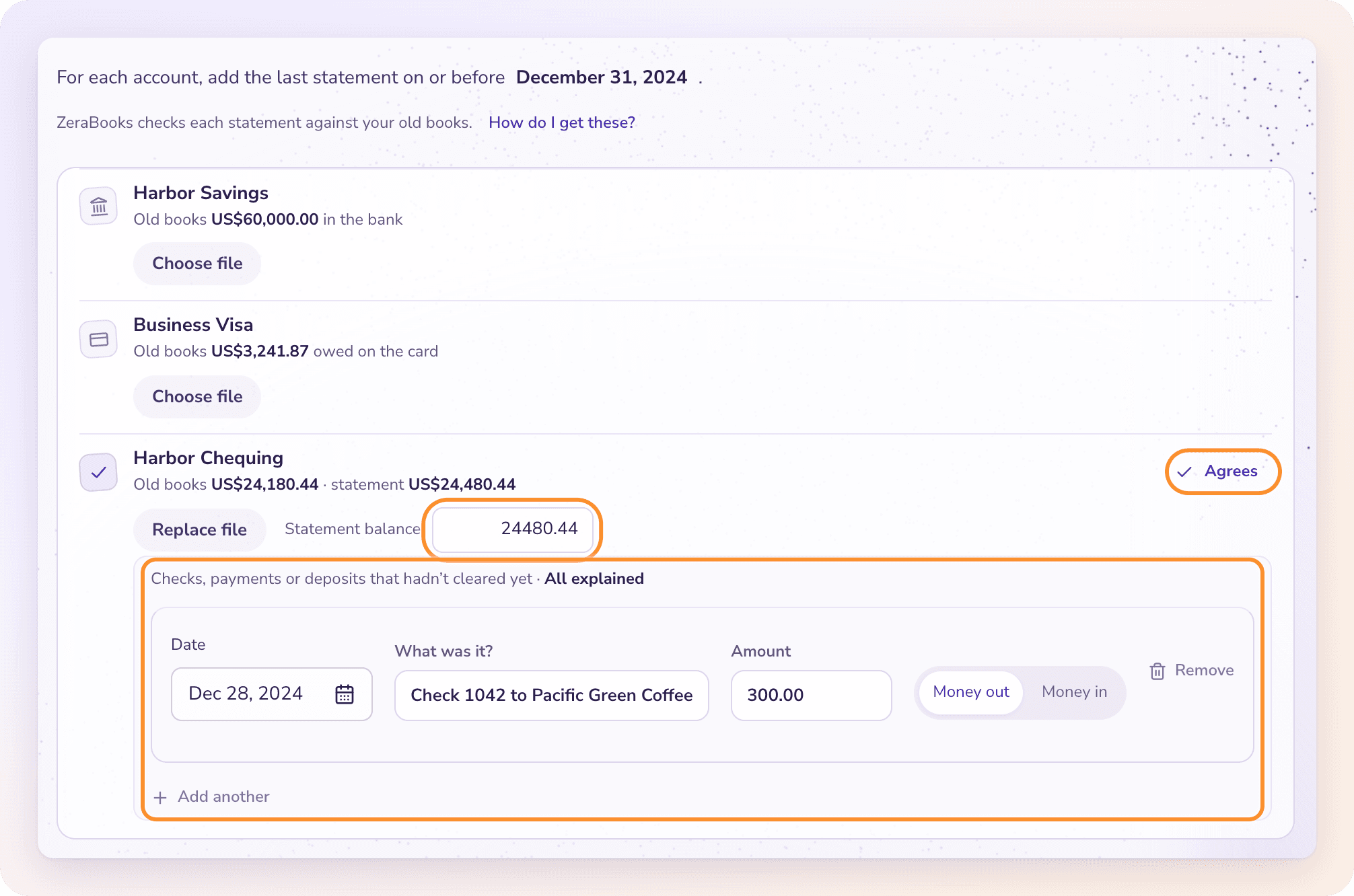
On a row that's Off by $X, click Explain the difference. ZeraBooks explains the usual cause, for example "Your books show $300.00 less than the bank. That is usually a check or payment you wrote that hadn't cleared by December 31, 2025."
A first item opens, already holding the difference. Fill in:
Date: when you wrote the check or made the deposit, on or before the closing date.
What was it?: for example "Check 1042 to a supplier".
Amount, then Money out or Money in. For a card: Card payment or Card charge.
More than one item? Click Add another. The line above the items shows how much is still to explain.
Remove an item you don't need with Remove.
When the items explain the whole difference, the line reads All explained and the row turns to Agrees.
Tip: When an uncleared check or deposit shows up on your first new statement, match it to its opening item so it isn't recorded twice. See Match manual entries to statement lines.
Frequently Asked Questions
My bank shows "Off by $X". What do I do?
Click Explain the difference and list each check, payment or deposit that hadn't cleared by the closing date, until the row reads Agrees. If the statement balance was read wrong, click Change the statement balance instead.
Which statement do I upload?
The last statement for that account dated on or before the day your old books close. It can be a PDF or CSV from your bank's website, or your old software's reconciliation report for that date.
My statement closed on the 25th but my books close on the 31st. Is that OK?
Yes. A statement that closed earlier in the month is fine. List anything between the statement date and the closing date that the statement doesn't show as an uncleared item.
What does "Choose a nonempty PDF, CSV or XLSX file no larger than 2 MiB." mean?
The statement file is empty, too large or in another format. Upload a PDF, CSV or .xlsx under 2 MB.
My trial balance has no bank accounts. Do I skip this stage?
Yes. ZeraBooks says "Your closing report has no bank or card accounts to carry forward." Click Continue.
Learn more about Pricing: One subscription for the General Ledger and Converter, with a one-week free trial.
Still stuck? A real person reads every message—come say hello.