Choose a starting point
Start fresh, books are up to date, or books need catching up. Which one fits your business, and how to pick the first day ZeraBooks keeps the books.
The three starting points
When you set up the books yourself (Set it up myself on How do you want to set up?), setup asks Where are the books today?. Pick the card that sounds like your business. ZeraBooks only asks for what that path needs. With Let Zera set it up, Zera works this out from your statements and you skip this step.
| Starting point | Pick it when | What comes next |
|---|---|---|
| Start fresh | The business is brand new: no money in or out yet, and no balances, loans, or unpaid invoices and bills. | Set up categories and name your bank and card accounts. |
| Books are up to date | Your books are current and reconciled in other software, and ZeraBooks takes over from a set day. | Bring your closing balances over in Opening books. |
| Books need catching up | Things fell behind, or you never got started. | Bring the last reliable balances over, then upload the missing statements from the first day onward. |
There's no separate option for QuickBooks, Xero or other software. If you're moving from one, choose Books are up to date or Books need catching up; you pick your software later, when you bring the closing reports.
Choose the first day in ZeraBooks
Choose Books are up to date or Books need catching up.
Click First day in ZeraBooks and pick the date from the calendar, or type it as YYYY-MM-DD and click Apply.
Books are up to date: the day after your previous books close.
Books need catching up: the day after your last reliable closing balance. Never kept books? Use your first day of business activity.
Check the handoff line under the date. It shows the day your old books close and the day ZeraBooks starts.
Click Continue.
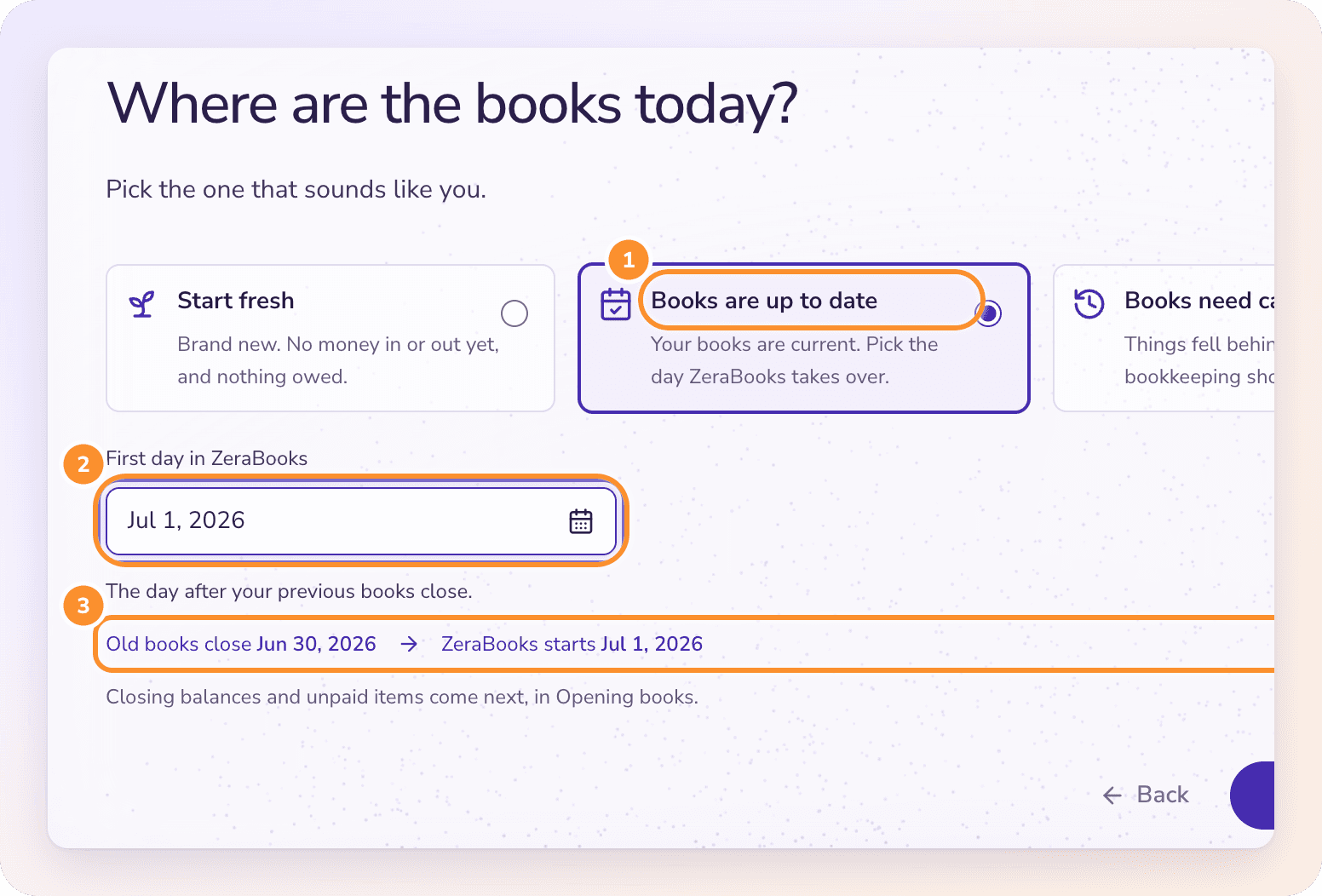
No files are needed on this step. Closing balances and unpaid items come later, in Opening books. See Move your books to ZeraBooks.
Tip: A month end is usually the easiest handoff. If your old books close on December 31, your first day in ZeraBooks is January 1. Your accountant may prefer a fiscal year end.
Frequently Asked Questions
What is the first day in ZeraBooks?
It's the date ZeraBooks takes over the bookkeeping. Everything before it stays in your old books and comes across as closing balances. Everything from it onward is recorded in ZeraBooks from your statements.
Can the first day be in the future?
Only as far as tomorrow. Your old books need to be closed before ZeraBooks takes over, so the latest date you can pick is tomorrow.
Will my old transactions come across?
No. ZeraBooks brings over the closing balances, unpaid invoices and bills, and uncleared bank items as of the day before your first day. Keep your old software's exports for anything earlier. You can optionally import past categorization so ZeraBooks learns how you categorized before.
I chose Start fresh, but the business has earlier activity. What do I do?
Before any transactions are recorded, go to Settings › Bookkeeping and click Actually, this business has earlier activity under Opening books. It takes you back to the starting point step.
My books are behind by several months. Which option do I choose?
Books need catching up. Use the day after your last reliable closing balance as the first day, then upload every statement from that day onward.
Learn more about Pricing: One subscription for the General Ledger and Converter, with a one-week free trial.
Still stuck? A real person reads every message—come say hello.