What Autopilot does for you
Autopilot works through your books in one pass: vendors, categories, bills and invoices, reminders, a second look, month-end and a monthly summary. It runs when you click Run now or while ZeraBooks is open.
Open Autopilot
In the left navigation, click Autopilot (or press G then P).
The header shows how much of your bookkeeping is running on its own:
hands-off: the share of bank transactions from the last 90 days that needed no one. A transaction counts as needing someone if you filed it yourself without the AI, it was marked ambiguous, or it has an open question.
things done in the last 30 days: actions still in effect (not undone or changed since).
new transactions in the last 90 days.
Last pass: when Autopilot last ran.
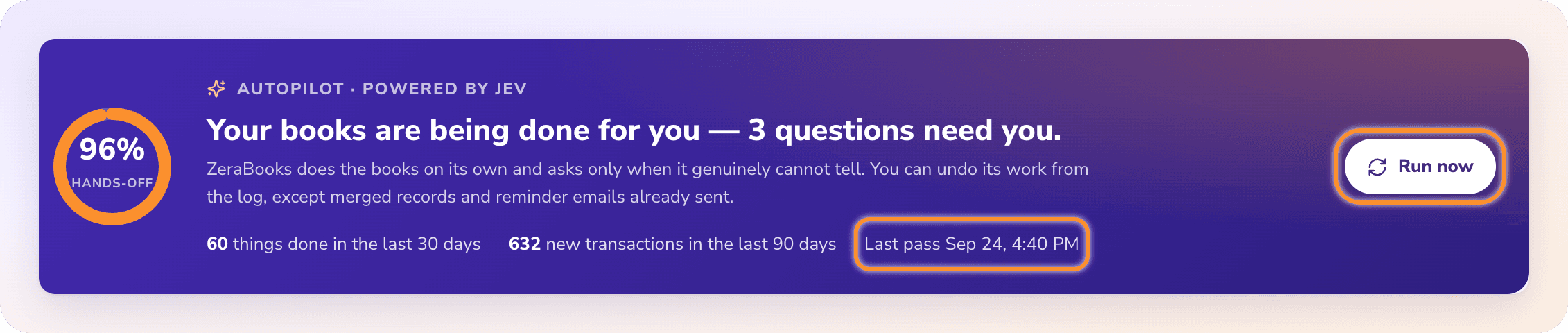
The Dashboards page shows the same summary in a strip at the top. Click it to open Autopilot.
When Autopilot runs
Autopilot runs in your browser session. There is no nightly or scheduled run, so nothing happens while ZeraBooks is closed.
A pass starts when:
You click Run now. The button reads Doing the books… until the pass finishes.
You open ZeraBooks. About 4 seconds after a page loads, a pass starts if this browser hasn't run one for the company in the last 20 minutes.
Something changes. About 8 seconds after you upload a statement or change a document or transaction, a pass starts.
When Run now finishes, a message tells you what happened, for example "Done: 12 things handled, 2 questions for you." or "Nothing new to do — the books are up to date."
Tip: After uploading a batch of statements, open Autopilot and click Run now to see the results straight away.
What one pass does
Each pass works through your books in this order. If one step fails, the others still run.
| Step | What Autopilot does |
|---|---|
| Vendors and customers | Links bank descriptions to saved vendors and customers, creates new ones for recurring names, and merges duplicates it is sure about |
| Bank transactions | Categorizes what the statement import couldn't place, moves personal purchases to Owner's Draws, and records equipment as an asset |
| Bills and invoices | Approves documents that pass every check and matches them to their bank payments |
| Receivables | Sends or proposes payment reminders for overdue invoices |
| Second look | Rechecks recent categories, makes one merchant's categories consistent, and flags possible duplicate charges |
| Month-end | Proposes depreciation, loan interest and prepaid spreads, asks about missing recurring bills, signs off tied months and closes the books |
| Digest | Writes a summary of the latest complete month |
Everything it does lands in Done by AI. Everything it can't decide lands in Needs you. See Answer Autopilot's questions and Review and undo AI actions.
Frequently Asked Questions
Does Autopilot run overnight?
No. There is no nightly or scheduled run. Autopilot runs when you click Run now, when you open ZeraBooks (at most every 20 minutes per company in the same browser), and a few seconds after you upload or change something.
What does the hands-off percentage mean?
It's the share of bank transactions from the last 90 days that needed no one: not filed by hand without the AI, not ambiguous and with no open question. It shows "—" when there's nothing to measure yet.
What happens if I click Run now twice?
Nothing extra. Only one pass runs per company at a time. A second request waits for the running pass and gets its result.
Does Autopilot work on months I've closed?
No. Anything dated in a closed period is skipped. To change those months, reopen the books first. See Close and reopen the books.
Why does Autopilot show "Could not load the autopilot."?
The page couldn't load. Check your connection and click Retry. If it says "Your session ended. Sign in again.", sign in again and reopen Autopilot.
What does "The autopilot could not run." mean?
The pass couldn't be completed, for example because the connection dropped. Anything it did before stopping is in Done by AI. Click Run now again.
Learn more about AI bookkeeping: Autopilot and Ask Zera keep the books inside a real general ledger.
Still stuck? A real person reads every message—come say hello.