Troubleshoot your books with Ask Zera
Ask Zera finds out why a month doesn't tie, why a number looks wrong, or whether anything is duplicated or missing. It re-reads the statement and your books, explains the cause in plain words, fixes it, and checks again until the month ties.
What can I ask Zera to investigate?
Describe what you see, in your own words:
"Why doesn't March tie?"
"My P&L shows $12,000 of software this year. That makes no sense."
"Why is this vendor so high?"
"Are there any duplicate transactions?"
"A payment is missing from April."
Zera investigates the way a bookkeeper would. It pulls the report or balance, drills into the transactions behind it, compares them with the bank statement, and checks for duplicates, miscategorized transactions, payments not matched to their bills or invoices, entries in the wrong period, and journal entries on the wrong account. Then it explains the cause in plain words, with the amounts, and fixes it.
How do I ask why a number on Financials is what it is?
In the left navigation, click Financials.
Click any amount.
In its details, click Ask Zera why.
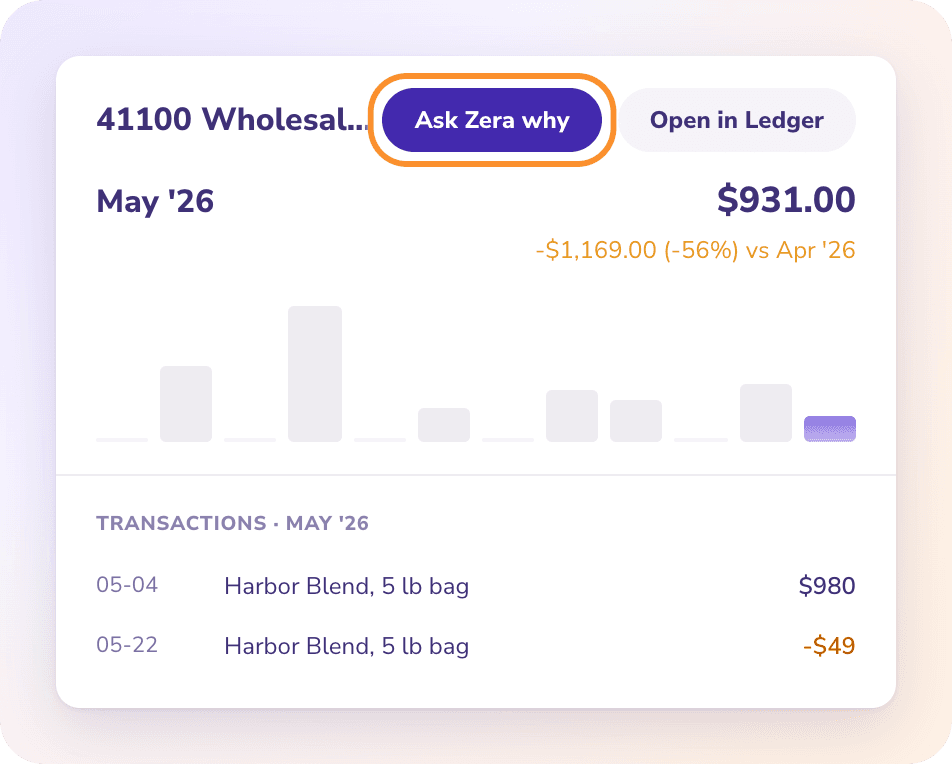
Zera opens with the question already asked: why the line is that amount for the period, compared with the period before, and what drove it. It answers with the transactions and changes that drove the figure.
How does Zera fix a month that doesn't tie?
Ask "Why doesn't April tie?", or "Why doesn't last month tie?" from Reconciliations. When Zera is doing your books, it does this by itself for every account-month that doesn't tie.
For each account that's off, Zera:
Names the check that failed, with its amount: the statement doesn't add up, its opening balance doesn't meet the previous closing balance, or the ledger is off from the printed closing balance.
Re-reads the statement and your books to find the cause. The usual ones:
Cause Example A row missing from the books A $42.10 fee the statement shows but ZeraBooks doesn't An extra row A row that isn't on the statement A wrong amount or sign A $1,250 deposit recorded as a $1,250 payment A transfer booked twice A $1,500 card payment recorded as two separate transfers Rows imported twice The same week of transactions brought in by two overlapping files
Fixes each cause on a card that says how much it moves the difference and quotes the evidence from the statement: Add a row the statement shows, Remove a row the statement doesn't show, Correct a statement row or Correct the statement balances.
Checks again, and repeats until the month ties.
When the month ties, Zera signs it off on a Sign off N account-months card. If the month was closed, Zera opens it just for the fix and closes it again to the same date; you don't need to approve that. For the same checks by hand, see Fix a month that doesn't tie.
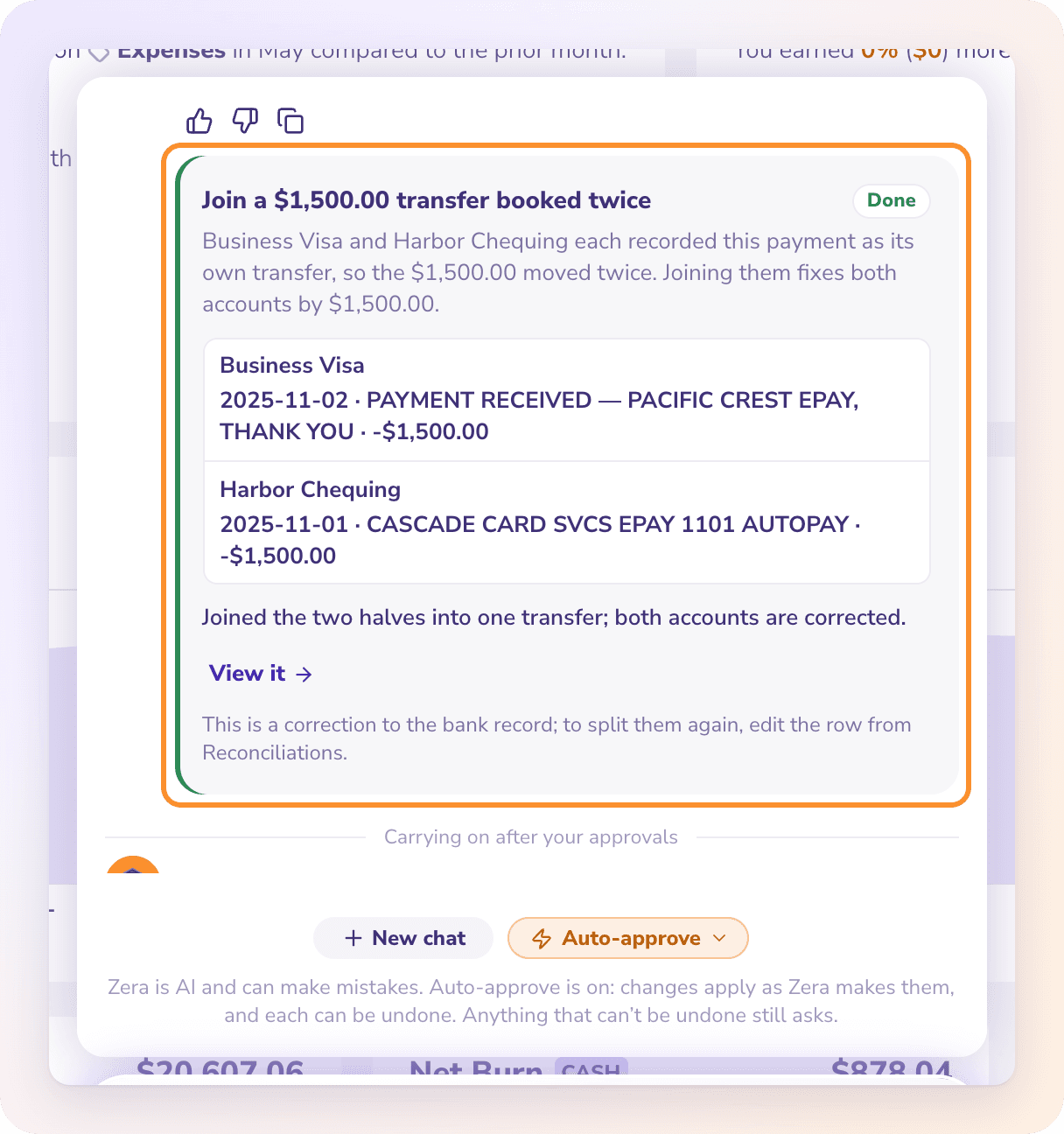
Important: Corrections to a statement's rows or balances can't be undone, so they always wait for your Approve, even with Auto-approve on. A removed row is deleted, not hidden; the statement file stays as the record. Only approve a removal when the bank statement really doesn't show the row.
Duplicates
Ask "Are there any duplicate transactions?". Zera looks for pairs on the same account with the same amount and merchant, within 3 days of each other, and judges each pair:
The same money entered twice (for example, a manual entry that repeats a statement line): Zera matches or removes the extra entry.
A real double charge from the vendor, shown twice on the bank statement: the money really left twice, so the fix is a refund from the vendor, not deleting a row. Zera tells you to ask the vendor for it.
Missing transactions
The bank statement shows it, but ZeraBooks doesn't: Zera adds the row as printed. It's categorized like an imported row.
It isn't on any statement: for cash, or a payment from an account you don't import, Zera records a manual transaction, or records it as paid on the bill or invoice.
A whole month is missing: Zera asks for the statement. See Give Zera statements, bills and receipts.
A number that looks wrong
Common causes Zera finds and fixes:
| Cause | The fix |
|---|---|
| Transactions in the wrong category | Move them, optionally with every transaction from the same merchant |
| A payment counted as an expense when it paid a bill | Match the payment to its bill |
| A bill or invoice dated in the wrong month | Edit the draft, or correct the approved one |
| A journal entry on the wrong account | Edit the journal entry |
| A vendor saved twice | Merge the two vendors |
Zera never recategorizes transfers between your own accounts, or bill and invoice payments: they aren't income or expense.
Frequently Asked Questions
Why doesn't my bank account reconcile?
Ask Zera "Why doesn't March tie?". It names the check that failed and the amount, re-reads the statement and your books to find the cause (a missing or extra row, a wrong amount or sign, a transfer booked twice, rows imported twice), fixes it and checks again until the month ties.
Will Zera delete a duplicate charge?
Not when the bank really charged you twice. That money left your account, so the row stays and the fix is a refund from the vendor. Zera only removes a row that isn't on the bank statement, and that removal always waits for your Approve.
Can Zera fix a transaction in a month that's closed or signed off?
Yes. Zera opens the closed month just for the fix and closes it again to the same date, without asking you. If the account-month was signed off, it reopens that sign-off, makes the fix and signs it off again once it ties.
How does "Ask Zera why" know which number I mean?
It sends Zera the line, the amount, the period and the previous period's amount you clicked. Zera answers from the same report code as Financials.
Does Zera guess amounts when it explains a difference?
No. Every amount comes from your books or the statement file. The AI judges what things mean; ZeraBooks does the arithmetic.
Learn more about AI bookkeeping: Autopilot and Ask Zera keep the books inside a real general ledger.
Still stuck? A real person reads every message—come say hello.