Profile and security
Edit your name and firm, change the email you sign in with, change your password, and resend the verification email.
Edit your profile
Open the company menu at the top of the left navigation and click Settings.
Under Your account, click Profile. It shows your name, Firm and Member since.
Click the pencil (Edit profile).
Edit First name, Last name and Firm name (optional).
Click Save, or Cancel to discard.
Change your sign-in email
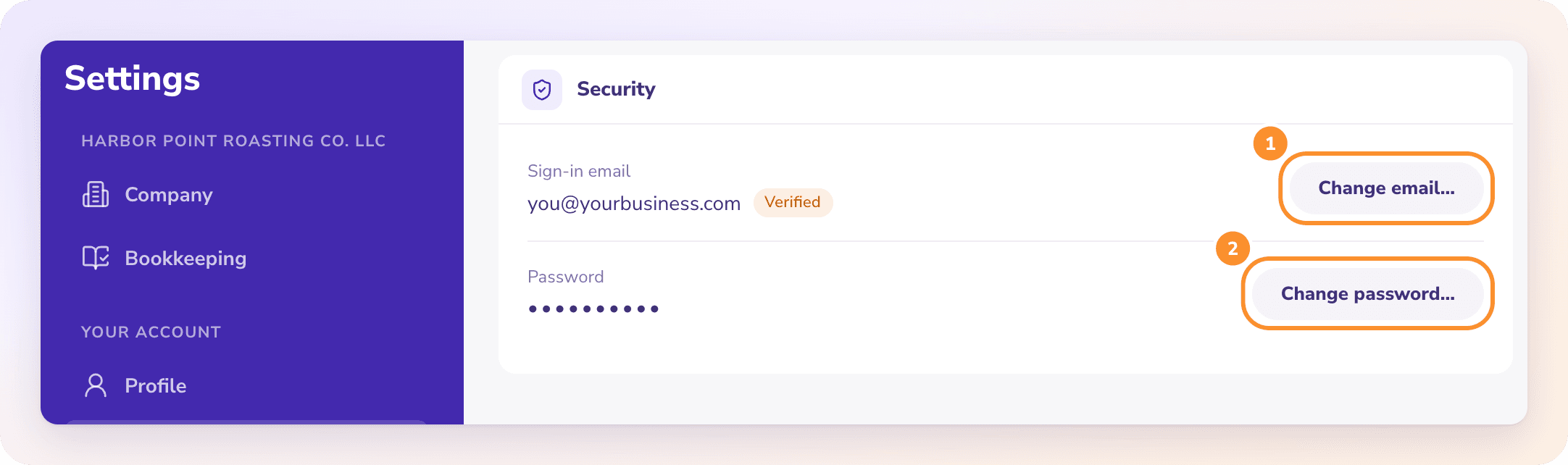
In Settings, click Security. Sign-in email shows your address and whether it's Verified or Unverified.
Click Change email….
Enter your Current password, then the New email and Confirm new email.
Click Send confirmation.
ZeraBooks sends a confirmation link to the new address. The change completes when you open it. Until then, keep signing in with your current email.
Change your password
In Settings › Security, click Change password….
Enter your Current password.
Enter the New password (at least 8 characters) and type it again in Confirm new password.
Click Update password.
Note: If you sign in with Google, Security says your email and password are managed there. Change them in your Google account.
Verify your email
If your sign-in email shows Unverified, click Resend verification email under it and open the link in the email.
Frequently Asked Questions
How do I change the email I sign in with?
Go to Settings › Security › Change email…, enter your current password and the new address twice, and click Send confirmation. Open the link sent to the new address to finish.
I changed my email but still sign in with the old one. Why?
The change isn't confirmed yet. Open the confirmation link sent to the new address. Until then, the old email stays your sign-in.
What does "The current password is incorrect. Nothing was changed." mean?
The password you entered to verify it's you doesn't match. Nothing was changed. Try again with your current password, or sign out and use Forgot password? on the sign-in page.
What are the password rules?
A new password needs at least 8 characters and must be different from the current one.
I forgot my password. How do I get back in?
On the sign-in page, click Forgot password?, enter your email and click Send reset link. Follow the link in the email.
Can I add team members or give someone else access?
No. ZeraBooks accounts are for one person. There are no team members, roles or shared logins.
Learn more about Pricing: One subscription for the General Ledger and Converter, with a one-week free trial.
Still stuck? A real person reads every message—come say hello.